

Adafruit IO HTTP API
The Adafruit IO HTTP API provides access to your Adafruit IO data from any programming language or hardware environment that can speak HTTP. The easiest way to get started is with an Adafruit Learning Guide and a simple Internet of Things capable device like the Feather Huzzah or a more complicated one like the PyPortal.
API Versions
Adafruit IO has more than one version of its HTTP API. A request is routed to a version by its path or by its Accept header:
- v2 is selected by the
/api/v2/path prefix, or by sendingAccept: application/vnd.adafruit.io.v2. - v1 is selected by the
/api/v1/path prefix, or by sendingAccept: application/vnd.adafruit.io.v1. - A request with no version in the path or header (for example
/api/{username}/feeds) is handled by v1, which is the default.
v2 is the documented and supported API, and everything in these docs uses it. v1 and unversioned paths still work so older clients keep running, but they are deprecated and are not documented here. Always use https://io.adafruit.com/api/v2/ for new projects.
About the API Docs
This API documentation is hosted on GitHub Pages and is available on GitHub.
Spotted something incorrect or broken? Click here to file an issue on the repository
For questions or comments visit the Adafruit IO Feedback page or the #help-with-adafruit-io channel on the Adafruit Discord server.
Authentication
Your Adafruit IO Key is used to restrict or grant access to your data. The key is unique and covers every use of the Adafruit IO API for your account. You can access your key on any IO page by clicking on the golden key icon:

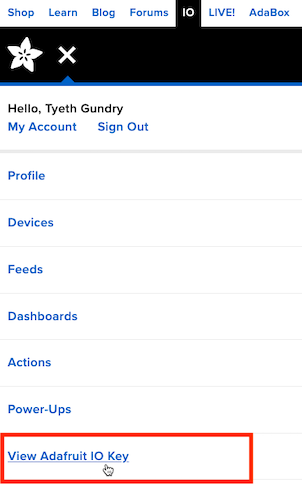
Or by clicking on the "View Adafruit IO Key" link in the small screen drop-down menu while you're visiting Adafruit IO.
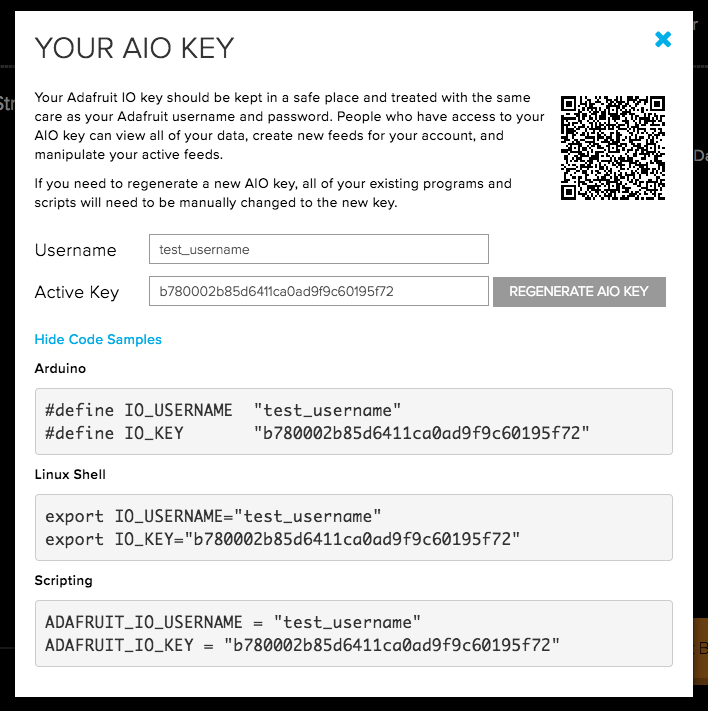
Now you can copy the key directly from the information form that pops up, or copy one of the code samples that includes your key and username together.
Including an Adafruit IO Key
curl -H "X-AIO-Key: b780002b85d6411ca0ad9f9c60195f72" \
    https://io.adafruit.com/api/v2/test_username/feeds

# or

curl "https://io.adafruit.com/api/v2/test_username/feeds?x-aio-key=b780002b85d6411ca0ad9f9c60195f72"
require 'adafruit/io'

username = "test_username"
api_key = "b780002b85d6411ca0ad9f9c60195f72"
api = Adafruit::IO::Client.new key: api_key, username: username
When making HTTP requests to Adafruit IO, you can include the API key as a query parameter named x-aio-key or as a request header named X-AIO-Key. In both cases, "X-AIO-Key" is case insensitive.
NOTE: if you regenerate your AIO key, your old key will be immediately invalidated, so you'll have to replace it in any scripts or sketches where it is in use.
NOTE: it is a best practice to avoid including your API key in the URL as a query parameter. Some situations may require this, but try to avoid it if you can.
Client Libraries
We have lots of client libraries to help you get started with your project:
Note: The following two libraries use V1 of the Adafruit API which have been deprecated.
They're all open source, so if they don't already do what you want, you can fork them and add any feature you'd like.
Rate Limiting
Adafruit IO imposes a rate limit on all data modification APIs to prevent excessive load on the service. If a user performs too many data create, update, or delete actions in a short period of time then the system will start rejecting requests.
If you have a free Adafruit IO Account, the rate limit is 30 data points per minute.
If you have upgraded to an Adafruit IO Plus account, the base rate limit is 60 data points per minute.
If you exceed this limit, HTTP requests are rejected with a 429 Too Many Requests response and a notice will be sent to the {username}/throttle MQTT topic. You can subscribe to the topic if you wish to know when the Adafruit IO rate limit has been exceeded for your user account. This limit applies to all Data record modification actions over the HTTP and MQTT APIs, so if you have multiple devices or clients publishing data, be sure to delay their updates enough that the total rate is below your account limit.
One data record modification is any action that creates, updates, or deletes a single Data record. When you send several records in one request (a group or batch create), each record counts as one action, and if there is not enough room left in your limit the whole request is rejected with 429 and no data is saved.
A best practice is to only save or modify data within the hot part of your code loop. You want to handle authentication and any other API requests (creating/getting feeds, etc) before you start your main code loop where you save data.
Repeatedly exceeding limits over MQTT can lead to a temporary ban. See the MQTT Rate Limiting page for details.
We have general API throttles to ensure the API isn't being improperly used either by accident or for nefarious purposes. This throttle level is higher than any data rate limit throttles, but you may run into it if your code isn't optimized. One example would be if in the main loop of your code you are not only sending data, but also authenticating, retrieving all feeds, or anything else that doesn't involve saving or modifying data to a feed. In that scenario, you would be hitting the API 3x more times than necessary, and could get throttled, even if you're saving data within your allotted rate limit.
HTTP Request Limits
Separately from the data rate, each API user (identified by IP address and API key) is limited to 300 HTTP requests per minute across the API. Some endpoints have stricter limits:
| Endpoint | Limit |
|---|---|
Feed sharing (/feeds/{feed_key}/shares) and coupon checks |
10 requests per minute |
POST to tokens, feedback, and social reports |
2 requests per minute per IP address |
Requests over a limit receive a 429 Too Many Requests response. For the overall and per-endpoint request limits the body is plain text (Retry later); for data rate limits it is JSON (see Errors). Wait a minute and retry.
Plan Limits
| Free | IO+ | |
|---|---|---|
| Feeds | 10 | Effectively unlimited |
| Dashboards | 5 | Effectively unlimited |
| Groups | 5 | Effectively unlimited |
| WipperSnapper devices | 2 | Effectively unlimited |
| Data rate | 30 data points per minute | 60 data points per minute |
| Data storage | 30 days | 60 days |
IO+ users can purchase boosts for a higher data rate and longer storage.
Storage is counted from the time data is uploaded, not from a record's created_at value, so records uploaded with a created_at in the past are kept for the full storage period from upload.
Pagination
Adafruit IO’s API returns 100 data points by default and at most 1000 at a time. To get more data if your feed is over that many data points, you’ll need to “paginate” the data.
What does this mean?
When you perform an HTTP data GET query, the results are sorted newest-to-oldest (see the note on start_time below) and include 5 X-Pagination-* headers and the Link header field in the response. You can see an example of the headers on the right.
Pagination Headers
X-Pagination-Count: 250
X-Pagination-Limit: 250
X-Pagination-Total: 83027
X-Pagination-Start:
X-Pagination-End: 2019-05-03T17:35:13.637+0000
Link: <https://io.adafruit.com/api/v2/abachman/feeds/humidity/data?end_time=2019-05-03+17%3A35%3A13+UTC&limit=250>;rel="next", <https://io.adafruit.com/api/v2/abachman/feeds/humidity/data?before=eyJ0aW1lX2lkIjoiMEU1M043N0syUjdUR1Y3MEY3UjJFUVlRVlkiLCJmZWVkX2lkIjoiNjE3MzcwLjAifQ%3D%3D&end_time=2019-05-03+17%3A35%3A13+UTC&limit=250>
- Count (
X-Pagination-Count) is the number of data points in the current request. - Limit (
X-Pagination-Limit) is the requested limit if it was included as a parameter (at most 1000), otherwise 100. - Total (
X-Pagination-Total) is the total number of data points in the feed for the givenstart_timeandend_time. Note, this value may be up to 5 minutes behind real time. - Start (
X-Pagination-Start) is an ISO-8601 formatted date value based on thestart_timeparameter in the original request, if one was given. - End (
X-Pagination-End) is an ISO-8601 formatted date value based either on theend_timeparameter from the original request or the time when the original request was made. - Link is a set of one or more URLs that point you to related resources.
Whenever Limit and Count are equal and Total is more than Count, that’s evidence that more data is available. That's where the Link (Link) header comes in.
The Link Header
For Adafruit IO Link always contains at least one URL inside angle brackets, that's the link to the page of data you are currently looking at. In the example above, the first URL is https://io.adafruit.com/api/v2/abachman/feeds/example.counter-1/data?end_time=2019-05-02+22%3A33%3A22+UTC&limit=250. The first URL given in the Link header can be used to request the same data set again in the future. Even if your original request didn't include any parameters, the Link URL will include an end_time parameter that reflects the time at which you made the request. This is how we can make sure you can request the same data repeatedly.
The example Link value above also includes a next section: rel="next", <https://io.adafruit.com/api/v2/abachman/feeds/example.counter-1/data?before=eyJ0aW1lX2lkIjoiMEU0V0RWSk1SNlgxNUgxV0FSR0c2SzFIRUgiLCJmZWVkX2lkIjoiNzMuMCJ9&end_time=2019-05-02+22%3A33%3A22+UTC&limit=250>. The rel="next" part is written right after the first URL, but it marks the URL that follows it as the next page of data (standard Link header parsers may not read it this way, so split the header on the comma instead). As long as there is more data available, the Link header will include a rel="next" URL. It updates on each request, so you can page through data by making a request, parsing the Link header to get a next URL, and then using that URL to make another request. If your initial request includes end_time, start_time, or limit parameters, those parameters will be included in the rel="next" URL. Data is sorted by descending created_at date (newest first, oldest last), so the next page of data is the next older page. The exception is a request with start_time but no end_time: it returns the oldest limit records after start_time, so include end_time whenever you paginate.
When visualized on a timeline, the concept of pagination looks like this:
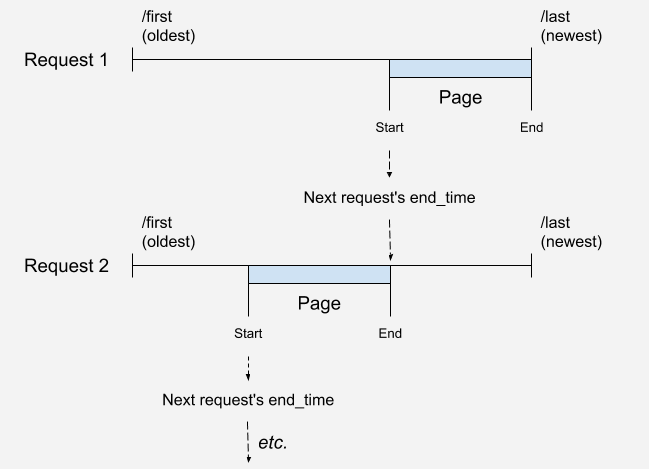
Note that long running, frequently updated feeds could have more than a hundred pages of data. In the example above, with a limit of 250 records, it would take 330 requests to get all the data. If you make requests without a small delay in between, you will hit a rate limit. To avoid this, watch for 429 HTTP error responses and handle them in code by adding a 30 second timeout between requests and request the largest size permitted, right now that's 1000 records.
If your goal is to store and study the data offline, though, you would be better off downloading the whole feed using the Download button built into Adafruit IO on the web.
You can find an example of a paginated data downloading script in Python at this link. Stop by the forums or Discord if you have more questions about getting your Data out of IO.
Data
Data is at the heart of Adafruit IO. Everything your device measures and records becomes a data point on an Adafruit IO Feed.
You can create, read, update, or delete data records. Every CREATE, UPDATE, or DELETE action on a data record counts against your data rate limit (points per minute), which is shared between HTTP and MQTT.
A data value may be at most 1024 bytes (1 KB) when the feed's history is on, and at most 524288 bytes (512 KB) when history is off. Larger values are rejected with a 422 error.
Data points belong to feeds, so every Data API call starts with a Feed URL.
Feeds can be addressed in any {feed_key} position by their key (for example temperature), by their numeric feed ID, or as group_key.feed_key to select a feed within a specific group.
Data reads default to JSON. Many read endpoints can also return CSV or plain text when the URL ends in .csv or .txt (or the Accept header asks for it). Endpoints that list data (GET .../data and GET .../data/{id}) can return GeoJSON when the request sends Accept: application/geojson (Content-Type: application/geojson also works); the response is an array of GeoJSON Feature objects (or a single Feature for one data point), and an optional callback query parameter wraps the result for JSONP. Records without a location are returned without a geometry.
Note that there are endpoints for submitting multiple data points to a feed, and multiple feed values to a group, see feeds/{feed_key}/data/batch and groups/{groupname}/data endpoints.
Create Data
HTTP Request
POST/api/v2/{username}/feeds/{feed_key}/data
# Send new data with a value of 42 (note: using single quotes instead prevents variable expansion etc in bash)
$ curl -F "value=42" -H "X-AIO-Key: {io_key}" https://io.adafruit.com/api/v2/{username}/feeds/{feed_key}/data

# Send new data with a value of 42 and include optional location metadata
curl -H "Content-Type: application/json" -d '{"value": 42, "lat": 23.1, "lon": "-73.3"}'  -H "X-AIO-Key: {io_key}" https://io.adafruit.com/api/v2/{username}/feeds/{feed_key}/data
# Adafruit IO Python

# Send data to feed feed_name with a value of 42
io.send_data(location_feed.key, '42')

# Send data to feed `feed_name` with a value of 42 and include optional location metadata
metadata = {'lat': 40.726190,
            'lon': -74.005334,
            'ele': -6,
            'created_at': None}
io.send_data(feed_name.key, data_value, metadata)

# Adafruit IO CircuitPython
# Send data to feed feed_name with a value of 42
io.send_data(location_feed['key'], '42')

# Send data to feed `feed_name` with a value of 42 and include optional location metadata
metadata = {'lat': 40.726190,
            'lon': -74.005334,
            'ele': -6,
            'created_at': None}
io.send_data(feed_name['key'], data_value, metadata)
// Send data to Feed `feedName` with value of 42
feedName->save(42);

// Send data to Feed `feedName` with value 42 and include optional location metadata
feedName->save(42, latValue, lonValue, eleValue);
Response Sample:
{
  "id": "string",
  "value": "string",
  "feed_id": 0,
  "feed_key": "string",
  "created_at": "datetime",
  "location": {},
  "lat": 0.0,
  "lon": 0.0,
  "ele": 0.0,
  "created_epoch": 0,
  "expiration": "datetime"
}
New data
Path Parameters
| Parameter | Type | Required | Description |
|---|---|---|---|
| username | string | true | a valid username string |
| feed_key | string | true | a valid feed key |
Body Parameters
| Parameter | Type | Required | Description |
|---|---|---|---|
| Request Body | object | true | Data record (datum) including a value field (required) and optionally including: lat, lon, ele (latitude, longitude, and elevation values), and created_at (a date/time string). created_at may be in the past but not in the future. Data retention is counted from the time of upload, not from created_at. |
Get Feed Data
HTTP Request
GET/api/v2/{username}/feeds/{feed_key}/data
$ curl -H "X-AIO-Key: {io_key}" https://io.adafruit.com/api/v2/{username}/feeds/{feed_key}/data

# get the most recent value
$ curl -H "X-AIO-Key: {io_key}" https://io.adafruit.com/api/v2/{username}/feeds/{feed_key}/data?limit=1

# get the most recent value before a particular time
$ curl -H "X-AIO-Key: {io_key}" "https://io.adafruit.com/api/v2/{username}/feeds/{feed_key}/data?limit=1&end_time=2019-05-05T00:00Z"

# get all values in a date range
$ curl -H "X-AIO-Key: {io_key}" "https://io.adafruit.com/api/v2/{username}/feeds/{feed_key}/data?start_time=2019-05-04T00:00Z&end_time=2019-05-05T00:00Z"
// Not implemented in Adafruit IO Arduino
# Not implemented in Adafruit IO Python

# Not implemented in Adafruit IO CircuitPython
Response Sample:
[
  {
    "id": "string",
    "value": "string",
    "feed_id": 0,
    "feed_key": "string",
    "created_at": "datetime",
    "location": {},
    "lat": 0.0,
    "lon": 0.0,
    "ele": 0.0,
    "created_epoch": 0,
    "expiration": "datetime"
  }
]
Response Parameters
An array of zero or more data points.
This API is paginated.
Path Parameters
| Parameter | Type | Required | Description |
|---|---|---|---|
| username | string | true | a valid username string |
| feed_key | string | true | a valid feed key |
Query Parameters
| Parameter | Type | Required | Description |
|---|---|---|---|
| start_time | string | false | Start time for filtering, returns records created after given time. Use ISO8601 formatted dates. If end_time is not given, you get the oldest limit records after start_time (still listed newest first); pass end_time as well to page through a time range. |
| end_time | string | false | End time for filtering, returns records created before give time. Use ISO8601 formatted dates. |
| limit | integer | false | Limit the number of records returned. Default is 100, maximum is 1000. |
| include | csv string | false | List of Data record fields to include in response records. Acceptable values are: value, lat, lon, ele, id, and created_at. |
| before | string | false | System generated token used to produce the next page of data. See The Link Header for details. |
Chart Feed Data
HTTP Request
GET/api/v2/{username}/feeds/{feed_key}/data/chart
# Query the chart API for the previous hour.
$ curl -H "X-AIO-Key: {io_key}" 'https://io.adafruit.com/api/v2/{username}/feeds/{feed_key}/data/chart?hours=1'
Response Sample:
{
  "feed": {
    "id": 0,
    "key": "string",
    "name": "string"
  },
  "parameters": {
    "start_time": "2019-02-28T16:17:09Z",
    "end_time": "2019-04-29T16:17:09Z",
    "resolution": 120,
    "hours": 1440,
    "field": "avg"
  },
  "columns": ["date", "value"],
  "data": [
    [ "2019-03-01T14:00:00Z", "62.579827586206896" ],
    [ "2019-03-02T18:00:00Z", "64.94642857142857" ],
    [ "...", "..."]
  ]
}
A JSON record containing chart data and the parameters used to generate it. This API will automatically calculate resolution based on the optimal time slice for the given start_time to end_time range or hours value given.
Charts on io.adafruit.com use this API with only the hours parameter to render charts on dashboards and feed pages.
Path Parameters
| Parameter | Type | Required | Description |
|---|---|---|---|
| username | string | true | a valid username string |
| feed_key | string | true | a valid feed key |
Query Parameters
| Parameter | Type | Required | Description |
|---|---|---|---|
| start_time | string | false | Start time for filtering, returns records created after given time. Use ISO8601 formatted dates. |
| end_time | string | false | End time for filtering, returns records created before give time. Use ISO8601 formatted dates. |
| resolution | int | false | Size of aggregation slice in minutes. Must be one of: 1, 5, 10, 30, 60, 120, 240, 480, or 960 |
| hours | int | false | Number of hours to include in the chart. This value is ignored if start_time and end_time are given. |
| field | string | false | Aggregate field to return. Must be one of: avg, sum, val, min, max, val_count |
| raw | boolean | false | Force raw chart data to be returned. Not compatible with field or resolution parameters. Use 1 or true for boolean true value. |
Create Multiple Data Records
HTTP Request
POST/api/v2/{username}/feeds/{feed_key}/data/batch
$ curl -H "Content-Type: application/json" -d @batch.json -H "X-AIO-Key: {io_key}" https://io.adafruit.com/api/v2/{username}/feeds/{feed_key}/data/batch
# Adafruit IO Python
data_list = [Data(value=50), Data(value=33)]
aio.send_batch_data(feed_name.key, data_list)

# Not implemented in Adafruit IO CircuitPython
Response Sample:
[
  {
    "id": "string",
    "value": "string",
    "feed_id": 0,
    "feed_key": "string",
    "created_at": "datetime",
    "location": {},
    "lat": 0.0,
    "lon": 0.0,
    "ele": 0.0,
    "created_epoch": 0,
    "expiration": "datetime"
  }
]
New data. Feeds with history turned off can't receive batches (400). Each record in the batch counts against your data rate limit, and if there aren't enough operations left for the whole batch, it is rejected with a 429 and nothing is saved. The value size limit and the created_at rules from Create Data apply to every record.
Path Parameters
| Parameter | Type | Required | Description |
|---|---|---|---|
| username | string | true | a valid username string |
| feed_key | string | true | a valid feed key |
Body Parameters
| Parameter | Type | Required | Description |
|---|---|---|---|
| data | array | true | A collection of data records including value (required) and optionally including: lat, lon, ele (latitude, longitude, and elevation values), and created_at (a date/time string). |
Get Previous Data
HTTP Request
GET/api/v2/{username}/feeds/{feed_key}/data/previous
# Adafruit IO Python
data = aio.receive_previous(feed.key)
Response Sample:
{
  "id": "string",
  "value": "string",
  "feed_id": 0,
  "feed_key": "string",
  "created_at": "datetime",
  "location": {},
  "lat": 0.0,
  "lon": 0.0,
  "ele": 0.0,
  "created_epoch": 0,
  "expiration": "datetime"
}
Data response
Path Parameters
| Parameter | Type | Required | Description |
|---|---|---|---|
| username | string | true | a valid username string |
| feed_key | string | true | a valid feed key |
Query Parameters
| Parameter | Type | Required | Description |
|---|---|---|---|
| include | string | false | List of Data record fields to include in response as comma separated list. Acceptable values are: value, lat, lon, ele, id, and created_at. |
Get Next Data
HTTP Request
GET/api/v2/{username}/feeds/{feed_key}/data/next
# Adafruit IO Python
data = aio.receive_next(feed.key)
Response Sample:
{
  "id": "string",
  "value": "string",
  "feed_id": 0,
  "feed_key": "string",
  "created_at": "datetime",
  "location": {},
  "lat": 0.0,
  "lon": 0.0,
  "ele": 0.0,
  "created_epoch": 0,
  "expiration": "datetime"
}
Data response
Path Parameters
| Parameter | Type | Required | Description |
|---|---|---|---|
| username | string | true | a valid username string |
| feed_key | string | true | a valid feed key |
Query Parameters
| Parameter | Type | Required | Description |
|---|---|---|---|
| include | string | false | List of Data record fields to include in response as comma separated list. Acceptable values are: value, lat, lon, ele, id, and created_at. |
Get Last Data
HTTP Request
GET/api/v2/{username}/feeds/{feed_key}/data/last
Response Sample:
{
  "id": "string",
  "value": "string",
  "feed_id": 0,
  "feed_key": "string",
  "created_at": "datetime",
  "location": {},
  "lat": 0.0,
  "lon": 0.0,
  "ele": 0.0,
  "created_epoch": 0,
  "expiration": "datetime"
}
Data response
Path Parameters
| Parameter | Type | Required | Description |
|---|---|---|---|
| username | string | true | a valid username string |
| feed_key | string | true | a valid feed key |
Query Parameters
| Parameter | Type | Required | Description |
|---|---|---|---|
| include | string | false | List of Data record fields to include in response as comma separated list. Acceptable values are: value, lat, lon, ele, id, and created_at. |
Get First Data
HTTP Request
GET/api/v2/{username}/feeds/{feed_key}/data/first
# Adafruit IO Python
data = aio.receive(feed.key)
Response Sample:
{
  "id": "string",
  "value": "string",
  "feed_id": 0,
  "feed_key": "string",
  "created_at": "datetime",
  "location": {},
  "lat": 0.0,
  "lon": 0.0,
  "ele": 0.0,
  "created_epoch": 0,
  "expiration": "datetime"
}
Data response.
Path Parameters
| Parameter | Type | Required | Description |
|---|---|---|---|
| username | string | true | a valid username string |
| feed_key | string | true | a valid feed key |
Query Parameters
| Parameter | Type | Required | Description |
|---|---|---|---|
| include | string | false | List of Data record fields to include in response as comma separated list. Acceptable values are: value, lat, lon, ele, id, and created_at. |
Get Most Recent Data
HTTP Request
GET/api/v2/{username}/feeds/{feed_key}/data/retain
Response Sample:
"string",0.0,0.0,0.0
CSV string in value,lat,lon,ele format. The lat, lon, and ele values are left blank if they are not set.
Path Parameters
| Parameter | Type | Required | Description |
|---|---|---|---|
| username | string | true | a valid username string |
| feed_key | string | true | a valid feed key |
Get Last Value
HTTP Request
GET/api/v2/{username}/feeds/{feed_key}/data/last_value
# plain text value of the most recent data point
$ curl -H "X-AIO-Key: {io_key}" https://io.adafruit.com/api/v2/{username}/feeds/{feed_key}/data/last_value

# the most recent data point as JSON
$ curl -H "X-AIO-Key: {io_key}" "https://io.adafruit.com/api/v2/{username}/feeds/{feed_key}/data/last_value?type=json"

# value,lat,lon,ele as CSV
$ curl -H "X-AIO-Key: {io_key}" "https://io.adafruit.com/api/v2/{username}/feeds/{feed_key}/data/last_value?type=csv"
Response Sample (no
type,text/plain):
22.5
Response Sample (
type=json):
{
  "id": "0F2ZQ4XJ6M3K8N1E7B9D5C0V4T",
  "value": "22.5",
  "feed_id": 1234,
  "feed_key": "temperature",
  "created_at": "2026-01-01T12:00:00Z",
  "created_epoch": 1767268800,
  "expiration": "2026-01-31T12:00:00Z"
}
Response Sample (
type=csv,text/plain):
22.5,40.7,-74.0,10.0
Returns the most recent value in the feed without paging through the data list. This is the same value you receive when subscribing to the feed's /get MQTT topic. Unlike first, next and previous, it works with read-only access, so it can also be used on public feeds.
With no type (or any unrecognized type) the response is the bare value as plain text. If the feed has never received data the response is a 404.
Path Parameters
| Parameter | Type | Required | Description |
|---|---|---|---|
| username | string | true | a valid username string |
| feed_key | string | true | a valid feed key |
Query Parameters
| Parameter | Type | Required | Description |
|---|---|---|---|
| type | string | false | json returns the data record as JSON; csv returns value,lat,lon,ele (lat, lon and ele are blank when not set). Anything else returns the value only. |
Get Data Point
HTTP Request
GET/api/v2/{username}/feeds/{feed_key}/data/{id}
# Adafruit IO Python
data = aio.receive(feed_name.key)

# Adafruit IO CircuitPython
data = aio.receive(feed_name['key'])
Response Sample:
{
  "id": "string",
  "value": "string",
  "feed_id": 0,
  "feed_key": "string",
  "created_at": "datetime",
  "location": {},
  "lat": 0.0,
  "lon": 0.0,
  "ele": 0.0,
  "created_epoch": 0,
  "expiration": "datetime"
}
Data response
Path Parameters
| Parameter | Type | Required | Description |
|---|---|---|---|
| username | string | true | a valid username string |
| feed_key | string | true | a valid feed key |
| id | string | true |
Query Parameters
| Parameter | Type | Required | Description |
|---|---|---|---|
| include | string | false | List of Data record fields to include in response as comma separated list. Acceptable values are: value, lat, lon, ele, id, and created_at. |
Update Data Point
HTTP Request
PUT/api/v2/{username}/feeds/{feed_key}/data/{id}
Response Sample:
{
  "id": "string",
  "value": "string",
  "feed_id": 0,
  "feed_key": "string",
  "created_at": "datetime",
  "location": {},
  "lat": 0.0,
  "lon": 0.0,
  "ele": 0.0,
  "created_epoch": 0,
  "expiration": "datetime"
}
Updated Data
Path Parameters
| Parameter | Type | Required | Description |
|---|---|---|---|
| username | string | true | a valid username string |
| feed_key | string | true | a valid feed key |
| id | string | true |
Body Parameters
| Parameter | Type | Required | Description |
|---|---|---|---|
| Request Body | object | true | Data record (datum) including a value field (required) and optionally including: lat, lon, ele (latitude, longitude, and elevation values), and created_at (a date/time string). |
Delete Data Point
HTTP Request
DELETE/api/v2/{username}/feeds/{feed_key}/data/{id}
# Adafruit IO Python
aio.delete(feed_name.key, data_id)

# Adafruit IO CircuitPython
aio.delete_data(feed_name['key'], data_id)
Response Sample:
Deleted Group successfully
Path Parameters
| Parameter | Type | Required | Description |
|---|---|---|---|
| username | string | true | a valid username string |
| feed_key | string | true | a valid feed key |
| id | string | true |
Download Feed Data
HTTP Request
POST/api/v2/{username}/feeds/{feed_key}/data/download.csvPOST/api/v2/{username}/feeds/{feed_key}/data/download.jsonGET/api/v2/{username}/feeds/{feed_key}/data/download/status
# request a CSV export of all data in the feed (use download.json for JSON)
$ curl -X POST -H "X-AIO-Key: {io_key}" https://io.adafruit.com/api/v2/{username}/feeds/{feed_key}/data/download.csv

# check progress and get a download link
$ curl -H "X-AIO-Key: {io_key}" https://io.adafruit.com/api/v2/{username}/feeds/{feed_key}/data/download/status
Response Sample (POST):
{
  "status": "ok"
}
Response Sample (GET status):
{
  "feed_id": 1234,
  "generated_at": "2026-01-01T12:05:00Z",
  "limited": true,
  "timeout": "540",
  "downloads": [
    {
      "url": "https://example.com/downloads/data.csv?expires=1767269160",
      "description": "Temperature CSV requested by {username}",
      "token": "a1b2c3d4e5f6",
      "state": "completed",
      "progress_percentage": 100.0,
      "file_size": "1.2 MB",
      "started_at": "2026-01-01T12:00:05Z",
      "completed_at": "2026-01-01T12:00:41Z"
    }
  ]
}
Requests an export of the complete data history of a feed you own. The export is built in the background, so the POST only queues it and returns {"status": "ok"}. The file format is chosen by the URL extension, .csv or .json; a request without one is not accepted.
To get the file, poll the status endpoint. It lists the feed's five most recent downloads. Each entry has a state (building, completed, or error), a progress_percentage, and a url for the file. The url expires after about a minute, so request the status again whenever you need a fresh link.
Only one download can be requested per feed every 10 minutes. A second request inside that window returns a 429 with an error message, plus these headers:
| Header | Description |
|---|---|
| X-RateLimit-LimitSeconds | the length of the cooldown window, in seconds |
| X-RateLimit-Timeout | seconds remaining until another download can be requested |
The status response reports the same cooldown: limited is true and timeout holds the seconds remaining while the cooldown is active. This is separate from the data rate limit, see Rate Limiting.
Path Parameters
| Parameter | Type | Required | Description |
|---|---|---|---|
| username | string | true | your username; downloads are only available for your own feeds |
| feed_key | string | true | a valid feed key |
Download All Account Data
HTTP Request
POST/api/v2/{username}/downloadGET/api/v2/{username}/download/status
# request an export of all your data
$ curl -X POST -H "X-AIO-Key: {io_key}" https://io.adafruit.com/api/v2/{username}/download

# check progress and get a download link
$ curl -H "X-AIO-Key: {io_key}" https://io.adafruit.com/api/v2/{username}/download/status
Response Sample (POST):
{
  "status": "ok"
}
Queues an export of all of your account's data. It works like the feed download above: the POST returns {"status": "ok"}, and the status endpoint (same response format, without feed_id) lists your five most recent account downloads with their state, progress_percentage and expiring url. Only one account download can be requested every 24 hours; a request during the cooldown returns a 429 with the X-RateLimit-LimitSeconds and X-RateLimit-Timeout headers.
Path Parameters
| Parameter | Type | Required | Description |
|---|---|---|---|
| username | string | true | your username |
Create Group Data
HTTP Request
POST/api/v2/{username}/groups/{group_key}/data
$ curl -H "Content-Type: application/json" -H "X-AIO-Key: {io_key}" \
    -d '{"feeds": [{"key": "temperature", "value": "22.5"}, {"key": "humidity", "value": "48"}]}' \
    https://io.adafruit.com/api/v2/{username}/groups/{group_key}/data
Response Sample:
[
  {
    "id": "string",
    "value": "string",
    "feed_id": 0,
    "feed_key": "string",
    "created_at": "datetime",
    "location": {},
    "lat": 0.0,
    "lon": 0.0,
    "ele": 0.0,
    "created_epoch": 0,
    "expiration": "datetime"
  }
]
An array of the new data points, one per feed. Feeds that don't exist in the group yet are created automatically. Feeds your key can't write to are skipped without an error. Each feed counts as one action against your data rate. If the whole request doesn't fit in your remaining rate, nothing is saved and a 429 is returned.
Path Parameters
| Parameter | Type | Required | Description |
|---|---|---|---|
| username | string | true | a valid username string |
| group_key | string | true |
Body Parameters
| Parameter | Type | Required | Description |
|---|---|---|---|
| feeds | array | true | A collection of records with key and value properties. |
| created_at | string | false | Timestamp applied to every data point. |
| location | object | false | { lat: number, lon: number, ele: number } applied to every data point. |
Example body: { "feeds": [ { "key": "temperature", "value": "22.5" } ], "created_at": "2026-01-01T00:00:00Z", "location": { "lat": 40.7, "lon": -74.0, "ele": 10 } }
Get Data for Group's Feed
HTTP Request
GET/api/v2/{username}/groups/{group_key}/feeds/{feed_key}/data
# Get data from the given Feed in the given Group
$ curl -H "X-AIO-Key: {io_key}" https://io.adafruit.com/api/v2/{username}/groups/{group_key}/feeds/{feed_key}/data
Response Sample:
{
  "id": "string",
  "value": "string",
  "feed_id": 0,
  "feed_key": "string",
  "created_at": "datetime",
  "location": {},
  "lat": 0.0,
  "lon": 0.0,
  "ele": 0.0,
  "created_epoch": 0,
  "expiration": "datetime"
}
An array of data
Path Parameters
| Parameter | Type | Required | Description |
|---|---|---|---|
| username | string | true | a valid username string |
| group_key | string | true | |
| feed_key | string | true | a valid feed key |
Create Data in a Group's Feed
HTTP Request
POST/api/v2/{username}/groups/{group_key}/feeds/{feed_key}/data
Response Sample:
{
  "id": "string",
  "value": "string",
  "feed_id": 0,
  "feed_key": "string",
  "created_at": "datetime",
  "location": {},
  "lat": 0.0,
  "lon": 0.0,
  "ele": 0.0,
  "created_epoch": 0,
  "expiration": "datetime"
}
New data
Path Parameters
| Parameter | Type | Required | Description |
|---|---|---|---|
| username | string | true | a valid username string |
| group_key | string | true | |
| feed_key | string | true | a valid feed key |
Body Parameters
| Parameter | Type | Required | Description |
|---|---|---|---|
| Request Body | object | true | Data record (datum) including a value field (required) and optionally including: lat, lon, ele (latitude, longitude, and elevation values), and created_at (a date/time string). |
Create Batch Data in a Group's Feed
HTTP Request
POST/api/v2/{username}/groups/{group_key}/feeds/{feed_key}/data/batch
Response Sample:
[
  {
    "id": "string",
    "value": "string",
    "feed_id": 0,
    "feed_key": "string",
    "created_at": "datetime",
    "location": {},
    "lat": 0.0,
    "lon": 0.0,
    "ele": 0.0,
    "created_epoch": 0,
    "expiration": "datetime"
  }
]
New data
Path Parameters
| Parameter | Type | Required | Description |
|---|---|---|---|
| username | string | true | a valid username string |
| group_key | string | true | |
| feed_key | string | true | a valid feed key |
Body Parameters
| Parameter | Type | Required | Description |
|---|---|---|---|
| data | array | true | A collection of data records including value (required) and optionally including: lat, lon, ele (latitude, longitude, and elevation values), and created_at (a date/time string). |
Feeds
Feeds are the core of the Adafruit IO system. The feed holds metadata about the data you push to Adafruit IO. This includes settings for whether the data is public or private, what license the stored data falls under, and a general description of the data. The feed also contains the sensor data values that get pushed to Adafruit IO from your device.
You will need to create one feed for each unique source of data you send to Adafruit IO.
Anywhere a {feed_key} is expected you can use the feed's key (for example temperature), its numeric feed ID, or group_key.feed_key to address the feed within a specific group.
You can create, read, update, or delete feeds. Creating, updating, and deleting feeds does not count against your data rate limit; only creating, updating, and deleting data does.
There are also endpoints for submitting multiple data points to a feed, or multiple feed values to a group, see feeds/{feed_key}/data/batch and groups/{groupname}/data endpoints.
All Feeds
HTTP Request
GET/api/v2/{username}/feeds
$ curl -H "X-AIO-Key: {io_key}" https://io.adafruit.com/api/v2/{username}/feeds/
# Adafruit IO Python
feeds = aio.feeds()

# Not implemented in Adafruit IO CircuitPython
Response Sample:
[
  {
    "id": 0,
    "name": "string",
    "key": "string",
    "group": {
      "id": 0,
      "name": "string",
      "description": "string",
      "created_at": "string",
      "updated_at": "string"
    },
    "groups": [
      {
        "id": 0,
        "name": "string",
        "description": "string",
        "created_at": "string",
        "updated_at": "string"
      }
    ],
    "description": "string",
    "details": {
      "shared_with": null,
      "data": {
        "first": {
          "id": "string",
          "value": "string",
          "feed_id": 0,
          "group_id": 0,
          "expiration": "string",
          "lat": 0,
          "lon": 0,
          "ele": 0,
          "completed_at": "string",
          "created_at": "string",
          "updated_at": "string",
          "created_epoch": 0
        },
        "last": {
          "id": "string",
          "value": "string",
          "feed_id": 0,
          "group_id": 0,
          "expiration": "string",
          "lat": 0,
          "lon": 0,
          "ele": 0,
          "completed_at": "string",
          "created_at": "string",
          "updated_at": "string",
          "created_epoch": 0
        },
        "count": 0
      }
    },
    "unit_type": "string",
    "unit_symbol": "string",
    "history": true,
    "visibility": "string",
    "license": "string",
    "enabled": true,
    "last_value": "string",
    "status": "string",
    "status_notify": true,
    "status_timeout": 0,
    "created_at": "string",
    "updated_at": "string"
  }
]
An array of feeds
Path Parameters
| Parameter | Type | Required | Description |
|---|---|---|---|
| username | string | true | a valid username string |
Public Feeds
HTTP Request
GET/api/v2/{username}/feeds?public=true
# list only the public feeds of a user (no key needed)
$ curl https://io.adafruit.com/api/v2/{username}/feeds?public=true

# read a public feed and its data
$ curl https://io.adafruit.com/api/v2/{username}/feeds/{feed_key}
$ curl https://io.adafruit.com/api/v2/{username}/feeds/{feed_key}/data
Feeds with visibility set to public can be read by anyone, with or without an X-AIO-Key. This covers the feed itself, its details, and reading its data (data, data/{id}, data/chart, data/last_value, data/retain, data/last). Public reads are subject to the same rate limiting as other requests, see Rate Limiting. Creating, updating or deleting always requires the owner's key. first, next and previous need write access, so they are not available on someone else's public feed.
GET /{username}/feeds returns the full feed list only when you request your own feeds. If you request another user's feeds, or add public=true to your own, the response contains only public feeds and leaves out owner-only fields such as status, status_notify and status_timeout. Private feeds are never listed or readable by other users, and are reported as not found.
Public groups work the same way: GET /{username}/groups/{group_key} can be read without a key when the group is public, and GET /{username}/groups?public=true (key required) lists only public groups.
Create Feed
HTTP Request
POST/api/v2/{username}/feeds
$ curl -X POST -H "Content-Type: application/json" -H "X-AIO-Key: {io_key}" \
    --data '{"feed": {"name": "New Feed"}}' \
    /{username}/feeds
AdafruitIO_Feed *newFeed = io.feed("newfeed");
# Adafruit IO Python
new_feed = Feed(name="newfeed")
aio.create_feed(new_feed)

# Adafruit IO CircuitPython
new_feed = io.create_new_feed('newfeed')
puts "create"
Feed = api.create_feed(name: "Feed #{SecureRandom.hex(4)}")
Response Sample:
{
  "id": 0,
  "name": "string",
  "key": "string",
  "group": {
    "id": 0,
    "name": "string",
    "description": "string",
    "created_at": "string",
    "updated_at": "string"
  },
  "groups": [
    {
      "id": 0,
      "name": "string",
      "description": "string",
      "created_at": "string",
      "updated_at": "string"
    }
  ],
  "description": "string",
  "details": {
    "shared_with": null,
    "data": {
      "first": {
        "id": "string",
        "value": "string",
        "feed_id": 0,
        "group_id": 0,
        "expiration": "string",
        "lat": 0,
        "lon": 0,
        "ele": 0,
        "completed_at": "string",
        "created_at": "string",
        "updated_at": "string",
        "created_epoch": 0
      },
      "last": {
        "id": "string",
        "value": "string",
        "feed_id": 0,
        "group_id": 0,
        "expiration": "string",
        "lat": 0,
        "lon": 0,
        "ele": 0,
        "completed_at": "string",
        "created_at": "string",
        "updated_at": "string",
        "created_epoch": 0
      },
      "count": 0
    }
  },
  "unit_type": "string",
  "unit_symbol": "string",
  "history": true,
  "visibility": "string",
  "license": "string",
  "enabled": true,
  "last_value": "string",
  "status": "string",
  "status_notify": true,
  "status_timeout": 0,
  "created_at": "string",
  "updated_at": "string"
}
New feed
Path Parameters
| Parameter | Type | Required | Description |
|---|---|---|---|
| username | string | true | a valid username string |
Query Parameters
| Parameter | Type | Required | Description |
|---|---|---|---|
| group_key | string | false |
Body Parameters
| Parameter | Type | Required | Description |
|---|---|---|---|
| feed | object | true | Feed settings. name is required on create and may be at most 128 characters. license may be at most 255 characters. status_timeout must be one of 10, 30, 60, 1440, 4320, or 10080 (minutes). |
Get Feed
HTTP Request
GET/api/v2/{username}/feeds/{feed_key}
$ curl -H "X-AIO-Key: {io_key}" /{username}/feeds/{feed_key}
# Adafruit IO Python
new_feed = aio.feeds('feedkey')

# Adafruit IO CircuitPython
new_feed = io.get_feed('feedkey')
puts "read?"
# ... get 404
begin
  api.feed(feedname['key'])
rescue => ex
  if ex.response.status === 404
    puts "expected error #{ex.response.status}: #{ex.message}"
  else
    puts "unexpected error! #{ex.message}"
  end
end
Response Sample:
{
  "id": 0,
  "name": "string",
  "key": "string",
  "group": {
    "id": 0,
    "name": "string",
    "description": "string",
    "created_at": "string",
    "updated_at": "string"
  },
  "groups": [
    {
      "id": 0,
      "name": "string",
      "description": "string",
      "created_at": "string",
      "updated_at": "string"
    }
  ],
  "description": "string",
  "details": {
    "shared_with": null,
    "data": {
      "first": {
        "id": "string",
        "value": "string",
        "feed_id": 0,
        "group_id": 0,
        "expiration": "string",
        "lat": 0,
        "lon": 0,
        "ele": 0,
        "completed_at": "string",
        "created_at": "string",
        "updated_at": "string",
        "created_epoch": 0
      },
      "last": {
        "id": "string",
        "value": "string",
        "feed_id": 0,
        "group_id": 0,
        "expiration": "string",
        "lat": 0,
        "lon": 0,
        "ele": 0,
        "completed_at": "string",
        "created_at": "string",
        "updated_at": "string",
        "created_epoch": 0
      },
      "count": 0
    }
  },
  "unit_type": "string",
  "unit_symbol": "string",
  "history": true,
  "visibility": "string",
  "license": "string",
  "enabled": true,
  "last_value": "string",
  "status": "string",
  "status_notify": true,
  "status_timeout": 0,
  "created_at": "string",
  "updated_at": "string"
}
Feed response
Path Parameters
| Parameter | Type | Required | Description |
|---|---|---|---|
| username | string | true | a valid username string |
| feed_key | string | true | a valid feed key |
Update Feed
HTTP Request
PUT/api/v2/{username}/feeds/{feed_key}
$ curl -H "X-AIO-Key: {io_key}" https://io.adafruit.com/api/v2/{username}/feeds/{feed_key}
// Not implemented in Adafruit IO Arduino
# Not implemented in Adafruit IO Python

# Not implemented in Adafruit IO CircuitPython
Response Sample:
{
  "id": 0,
  "name": "string",
  "key": "string",
  "group": {
    "id": 0,
    "name": "string",
    "description": "string",
    "created_at": "string",
    "updated_at": "string"
  },
  "groups": [
    {
      "id": 0,
      "name": "string",
      "description": "string",
      "created_at": "string",
      "updated_at": "string"
    }
  ],
  "description": "string",
  "details": {
    "shared_with": null,
    "data": {
      "first": {
        "id": "string",
        "value": "string",
        "feed_id": 0,
        "group_id": 0,
        "expiration": "string",
        "lat": 0,
        "lon": 0,
        "ele": 0,
        "completed_at": "string",
        "created_at": "string",
        "updated_at": "string",
        "created_epoch": 0
      },
      "last": {
        "id": "string",
        "value": "string",
        "feed_id": 0,
        "group_id": 0,
        "expiration": "string",
        "lat": 0,
        "lon": 0,
        "ele": 0,
        "completed_at": "string",
        "created_at": "string",
        "updated_at": "string",
        "created_epoch": 0
      },
      "count": 0
    }
  },
  "unit_type": "string",
  "unit_symbol": "string",
  "history": true,
  "visibility": "string",
  "license": "string",
  "enabled": true,
  "last_value": "string",
  "status": "string",
  "status_notify": true,
  "status_timeout": 0,
  "created_at": "string",
  "updated_at": "string"
}
Updated feed
Path Parameters
| Parameter | Type | Required | Description |
|---|---|---|---|
| username | string | true | a valid username string |
| feed_key | string | true | a valid feed key |
Body Parameters
| Parameter | Type | Required | Description |
|---|---|---|---|
| feed | object | true | Feed settings. name is required on create and may be at most 128 characters. license may be at most 255 characters. status_timeout must be one of 10, 30, 60, 1440, 4320, or 10080 (minutes). |
Delete Feed
HTTP Request
DELETE/api/v2/{username}/feeds/{feed_key}
$ curl -H "X-AIO-Key: {io_key}" https://io.adafruit.com/api/v2/{username}/feeds/{feed_key}
# Adafruit IO Python
io.delete_feed(feed_name.key)

# Adafruit IO CircuitPython
io.delete_feed(feed_name['key'])
puts "delete"
api.delete_feed(feed)
Response Sample:
Deleted feed successfully
Path Parameters
| Parameter | Type | Required | Description |
|---|---|---|---|
| username | string | true | a valid username string |
| feed_key | string | true | a valid feed key |
Get Feed Details
HTTP Request
GET/api/v2/{username}/feeds/{feed_key}/details
$ curl -H "X-AIO-Key: {io_key}" https://io.adafruit.com/api/v2/{username}/feeds/{feed_key}/details
// Not implemented in Adafruit IO Arduino
# Not implemented in Adafruit IO Python

# Not implemented in Adafruit IO CircuitPython
puts "read"
puts JSON.pretty_generate(api.feed_details(feed))
Response Sample:
{
  "id": 0,
  "name": "string",
  "key": "string",
  "group": {
    "id": 0,
    "name": "string",
    "description": "string",
    "created_at": "string",
    "updated_at": "string"
  },
  "groups": [
    {
      "id": 0,
      "name": "string",
      "description": "string",
      "created_at": "string",
      "updated_at": "string"
    }
  ],
  "description": "string",
  "details": {
    "shared_with": null,
    "data": {
      "first": {
        "id": "string",
        "value": "string",
        "feed_id": 0,
        "group_id": 0,
        "expiration": "string",
        "lat": 0,
        "lon": 0,
        "ele": 0,
        "completed_at": "string",
        "created_at": "string",
        "updated_at": "string",
        "created_epoch": 0
      },
      "last": {
        "id": "string",
        "value": "string",
        "feed_id": 0,
        "group_id": 0,
        "expiration": "string",
        "lat": 0,
        "lon": 0,
        "ele": 0,
        "completed_at": "string",
        "created_at": "string",
        "updated_at": "string",
        "created_epoch": 0
      },
      "count": 0
    }
  },
  "unit_type": "string",
  "unit_symbol": "string",
  "history": true,
  "visibility": "string",
  "license": "string",
  "enabled": true,
  "last_value": "string",
  "status": "string",
  "status_notify": true,
  "status_timeout": 0,
  "created_at": "string",
  "updated_at": "string"
}
Feed response
Path Parameters
| Parameter | Type | Required | Description |
|---|---|---|---|
| username | string | true | a valid username string |
| feed_key | string | true | a valid feed key |
Feed Sharing
Share a feed with another Adafruit IO user so they can read it (or read and write it) with their own account and key. Sharing is managed by the feed owner, using the owner's {username} and key. Shares are per feed.
A share has a level:
| Level | Effect |
|---|---|
readable |
the default. The shared user can read the feed and its data. |
writable |
the shared user can read the feed and its data, and also write to it. |
A share also has a status: pending (invited, not yet answered), approved, ignored (declined or blocked by the invitee) or cancelled. Access is granted when the invitee approves and revoked if the share is deleted, ignored, or set back to pending.
Once approved, the shared user addresses the feed through the owner's username, with their own key. For example, over HTTP they can use GET /api/v2/{owner_username}/feeds/{feed_key}/data, and over MQTT they can subscribe to {owner_username}/feeds/{feed_key}. Writes need the writable level. Data sent to a shared feed counts against the owner's data rate (see Rate Limiting).
Limits and rules:
- An owner can have at most 10 pending shares. Delete some, or wait for them to be answered.
- A disabled feed cannot be shared.
- You cannot share a feed with yourself, with a user who has blocked you, or with someone who has already declined it.
- A feed can be shared with a given user or email address only once.
- Requests to
/feeds/{feed_key}/shares(list and create) are limited to 10 per minute. See Rate Limiting.
Dashboard sharing is not available through the API.
Create Feed Share
Invite a user to share a feed. user_email accepts either a username or an email address. If it matches an existing Adafruit IO user they are invited right away; otherwise an invitation is emailed to that address, which must be a valid email address.
HTTP Request
POST/api/v2/{username}/feeds/{feed_key}/shares
curl -H "X-AIO-Key: {io_key}" -H "Content-Type: application/json" \
  -d '{"feed_share": {"user_email": "friend@example.com", "level": "readable"}}' \
  https://io.adafruit.com/api/v2/{username}/feeds/temperature/shares
Response Sample:
{
  "id": 17,
  "level": "readable",
  "status": "pending",
  "user_identifier": "friend@example.com",
  "user": null,
  "owner": { "username": "{username}" }
}
For an existing user, user is {"username": "..."} and user_identifier is their username. Errors: 403 (feed disabled, pending limit reached, self-share, duplicate or blocked share), 422 (invalid email address), 404 (unknown feed).
Path Parameters
| Parameter | Type | Required | Description |
|---|---|---|---|
| username | string | true | the feed owner's username (must match the key) |
| feed_key | string | true | a valid feed key |
Body Parameters
The body is wrapped in a feed_share object.
| Parameter | Type | Required | Description |
|---|---|---|---|
| user_email | string | true | username or email address of the person to share with |
| level | string | false | readable (default) or writable |
List Feed Shares
List the pending and approved shares of a feed, newest first.
HTTP Request
GET/api/v2/{username}/feeds/{feed_key}/shares
curl -H "X-AIO-Key: {io_key}" \
  https://io.adafruit.com/api/v2/{username}/feeds/temperature/shares
Response Sample:
[
  {
    "id": 17,
    "level": "readable",
    "status": "approved",
    "user_identifier": "friend",
    "user": { "username": "friend" },
    "owner": { "username": "{username}" }
  }
]
Only the feed owner can list shares. Path parameters are the same as for Create Feed Share.
Update Feed Share
Change the level of a share. If the share is already approved, the shared user's access changes immediately.
HTTP Request
PUT/api/v2/{username}/feeds/{feed_key}/shares/{id}
curl -X PUT -H "X-AIO-Key: {io_key}" -H "Content-Type: application/json" \
  -d '{"feed_share": {"level": "writable"}}' \
  https://io.adafruit.com/api/v2/{username}/feeds/temperature/shares/17
The response is the updated share, in the format shown above, plus a feed object (name, key, last_value).
Path Parameters
| Parameter | Type | Required | Description |
|---|---|---|---|
| username | string | true | the feed owner's username |
| feed_key | string | true | a valid feed key |
| id | integer | true | the share id |
Body Parameters
| Parameter | Type | Required | Description |
|---|---|---|---|
| level | string | true | readable or writable |
Delete Feed Share
Delete a share and revoke the shared user's access. The shared user can also delete a share to stop receiving the feed. This does not delete the feed or its data.
HTTP Request
DELETE/api/v2/{username}/feeds/{feed_key}/shares/{id}
curl -X DELETE -H "X-AIO-Key: {io_key}" \
  https://io.adafruit.com/api/v2/{username}/feeds/temperature/shares/17
The response is the deleted share. Path parameters are the same as for Update Feed Share.
Respond to a Feed Share
An invited user responds using the invitation's token, which is included in the link in the invitation email. Use the key of the invited user. Only pending shares can be approved or ignored. Each call returns the share.
HTTP Request
POST/api/v2/{username}/feeds/{feed_key}/shares/{token}/approvePOST/api/v2/{username}/feeds/{feed_key}/shares/{token}/ignorePOST/api/v2/{username}/feeds/{feed_key}/shares/{token}/block
curl -X POST -H "X-AIO-Key: {io_key}" \
  https://io.adafruit.com/api/v2/{owner_username}/feeds/temperature/shares/{token}/approve
| Action | Effect |
|---|---|
| approve | accept the share and gain access to the feed |
| ignore | decline the share |
| block | decline the share and block the sender from sharing with you again |
Here {username} and {feed_key} are those of the owner and the feed in the invitation.
Groups
A Group Record
{
  "id": 0,
  "name": "string",
  "description": "string",
  "feeds": [
    {
      "id": 0,
      "name": "string",
      "key": "string",
      "group": {
        "id": 0,
        "name": "string",
        "description": "string",
        "created_at": "string",
        "updated_at": "string"
      },
      "groups": [
        {
          "id": 0,
          "name": "string",
          "description": "string",
          "created_at": "string",
          "updated_at": "string"
        }
      ],
      "description": "string",
      "unit_type": "string",
      "unit_symbol": "string",
      "history": true,
      "visibility": "string",
      "license": "string",
      "enabled": true,
      "last_value": "string",
      "status": "string",
      "status_notify": true,
      "status_timeout": 0,
      "created_at": "string",
      "updated_at": "string"
    }
  ],
  "created_at": "string",
  "updated_at": "string"
}
Groups are a set of Feeds. They're used for publishing and reading to multiple feeds at a time.
For example, if you are building a weather station, you would add feeds for humidity and temperature to a new weatherstation group.
You can create, read, update, or delete group records. Every CREATE, UPDATE, or DELETE action on a group record counts against your rate limit.
There is also an endpoint for submitting multiple feed values to a group, see the groups/{groupname}/data endpoint.
Get All Groups
HTTP Request
GET/api/v2/{username}/groups
$ curl -H "X-AIO-Key: {your_aio_key}" http://io.adafruit.com/api/v2/{your_username}/groups
Response Sample:
[
  {
    "id": 0,
    "name": "string",
    "description": "string",
    "feeds": [
      {
        "id": 0,
        "name": "string",
        "key": "string",
        "group": {
          "id": 0,
          "name": "string",
          "description": "string",
          "created_at": "string",
          "updated_at": "string"
        },
        "groups": [
          {
            "id": 0,
            "name": "string",
            "description": "string",
            "created_at": "string",
            "updated_at": "string"
          }
        ],
        "description": "string",
        "details": {
          "shared_with": null,
          "data": {
            "first": {
              "id": "string",
              "value": "string",
              "feed_id": 0,
              "group_id": 0,
              "expiration": "string",
              "lat": 0,
              "lon": 0,
              "ele": 0,
              "completed_at": "string",
              "created_at": "string",
              "updated_at": "string",
              "created_epoch": 0
            },
            "last": {
              "id": "string",
              "value": "string",
              "feed_id": 0,
              "group_id": 0,
              "expiration": "string",
              "lat": 0,
              "lon": 0,
              "ele": 0,
              "completed_at": "string",
              "created_at": "string",
              "updated_at": "string",
              "created_epoch": 0
            },
            "count": 0
          }
        },
        "unit_type": "string",
        "unit_symbol": "string",
        "history": true,
        "visibility": "string",
        "license": "string",
        "enabled": true,
        "last_value": "string",
        "status": "string",
        "status_notify": true,
        "status_timeout": 0,
        "created_at": "string",
        "updated_at": "string"
      }
    ],
    "created_at": "string",
    "updated_at": "string"
  }
]
An array of groups with their respective feeds .
Path Parameters
| Parameter | Type | Required | Description |
|---|---|---|---|
| username | string | true | a valid username string |
Create Group
HTTP Request
POST/api/v2/{username}/groups
$ curl -F 'name=New Group' -H "X-AIO-Key: {your_aio_key}" https://io.adafruit.com/api/v2/{username}/groups/
AdafruitIO_Group *group = io.group("example");
Response Sample:
{
  "id": 0,
  "name": "string",
  "description": "string",
  "feeds": [
    {
      "id": 0,
      "name": "string",
      "key": "string",
      "group": {
        "id": 0,
        "name": "string",
        "description": "string",
        "created_at": "string",
        "updated_at": "string"
      },
      "groups": [
        {
          "id": 0,
          "name": "string",
          "description": "string",
          "created_at": "string",
          "updated_at": "string"
        }
      ],
      "description": "string",
      "details": {
        "shared_with": null,
        "data": {
          "first": {
            "id": "string",
            "value": "string",
            "feed_id": 0,
            "group_id": 0,
            "expiration": "string",
            "lat": 0,
            "lon": 0,
            "ele": 0,
            "completed_at": "string",
            "created_at": "string",
            "updated_at": "string",
            "created_epoch": 0
          },
          "last": {
            "id": "string",
            "value": "string",
            "feed_id": 0,
            "group_id": 0,
            "expiration": "string",
            "lat": 0,
            "lon": 0,
            "ele": 0,
            "completed_at": "string",
            "created_at": "string",
            "updated_at": "string",
            "created_epoch": 0
          },
          "count": 0
        }
      },
      "unit_type": "string",
      "unit_symbol": "string",
      "history": true,
      "visibility": "string",
      "license": "string",
      "enabled": true,
      "last_value": "string",
      "status": "string",
      "status_notify": true,
      "status_timeout": 0,
      "created_at": "string",
      "updated_at": "string"
    }
  ],
  "created_at": "string",
  "updated_at": "string"
}
New Group
Path Parameters
| Parameter | Type | Required | Description |
|---|---|---|---|
| username | string | true | a valid username string |
Body Parameters
| Parameter | Type | Required | Description |
|---|---|---|---|
| group | object | true |
Get Group
HTTP Request
GET/api/v2/{username}/groups/{group_key}
curl -H "X-AIO-Key: {your_aio_key}" https://io.adafruit.com/api/v2/{username}/groups/{group_key}
Response Sample:
{
  "id": 0,
  "name": "string",
  "description": "string",
  "feeds": [
    {
      "id": 0,
      "name": "string",
      "key": "string",
      "group": {
        "id": 0,
        "name": "string",
        "description": "string",
        "created_at": "string",
        "updated_at": "string"
      },
      "groups": [
        {
          "id": 0,
          "name": "string",
          "description": "string",
          "created_at": "string",
          "updated_at": "string"
        }
      ],
      "description": "string",
      "details": {
        "shared_with": null,
        "data": {
          "first": {
            "id": "string",
            "value": "string",
            "feed_id": 0,
            "group_id": 0,
            "expiration": "string",
            "lat": 0,
            "lon": 0,
            "ele": 0,
            "completed_at": "string",
            "created_at": "string",
            "updated_at": "string",
            "created_epoch": 0
          },
          "last": {
            "id": "string",
            "value": "string",
            "feed_id": 0,
            "group_id": 0,
            "expiration": "string",
            "lat": 0,
            "lon": 0,
            "ele": 0,
            "completed_at": "string",
            "created_at": "string",
            "updated_at": "string",
            "created_epoch": 0
          },
          "count": 0
        }
      },
      "unit_type": "string",
      "unit_symbol": "string",
      "history": true,
      "visibility": "string",
      "license": "string",
      "enabled": true,
      "last_value": "string",
      "status": "string",
      "status_notify": true,
      "status_timeout": 0,
      "created_at": "string",
      "updated_at": "string"
    }
  ],
  "created_at": "string",
  "updated_at": "string"
}
Group response
Path Parameters
| Parameter | Type | Required | Description |
|---|---|---|---|
| username | string | true | a valid username string |
| group_key | string | true |
Update Group
HTTP Request
PUT/api/v2/{username}/groups/{group_key}
$ curl -F 'name=Group' -H "X-AIO-Key: {your_aio_key}" https://io.adafruit.com/api/v2/{username}/groups/{group_key}
Response Sample:
{
  "id": 0,
  "name": "string",
  "description": "string",
  "feeds": [
    {
      "id": 0,
      "name": "string",
      "key": "string",
      "group": {
        "id": 0,
        "name": "string",
        "description": "string",
        "created_at": "string",
        "updated_at": "string"
      },
      "groups": [
        {
          "id": 0,
          "name": "string",
          "description": "string",
          "created_at": "string",
          "updated_at": "string"
        }
      ],
      "description": "string",
      "details": {
        "shared_with": null,
        "data": {
          "first": {
            "id": "string",
            "value": "string",
            "feed_id": 0,
            "group_id": 0,
            "expiration": "string",
            "lat": 0,
            "lon": 0,
            "ele": 0,
            "completed_at": "string",
            "created_at": "string",
            "updated_at": "string",
            "created_epoch": 0
          },
          "last": {
            "id": "string",
            "value": "string",
            "feed_id": 0,
            "group_id": 0,
            "expiration": "string",
            "lat": 0,
            "lon": 0,
            "ele": 0,
            "completed_at": "string",
            "created_at": "string",
            "updated_at": "string",
            "created_epoch": 0
          },
          "count": 0
        }
      },
      "unit_type": "string",
      "unit_symbol": "string",
      "history": true,
      "visibility": "string",
      "license": "string",
      "enabled": true,
      "last_value": "string",
      "status": "string",
      "status_notify": true,
      "status_timeout": 0,
      "created_at": "string",
      "updated_at": "string"
    }
  ],
  "created_at": "string",
  "updated_at": "string"
}
Returns the updated group. A feed can't be removed from its last group (400, "Feed only exists in this group"); delete the feed instead. The feed itself is not deleted.
Path Parameters
| Parameter | Type | Required | Description |
|---|---|---|---|
| username | string | true | a valid username string |
| group_key | string | true |
Body Parameters
| Parameter | Type | Required | Description |
|---|---|---|---|
| group | object | true |
Delete Group
HTTP Request
DELETE/api/v2/{username}/groups/{group_key}
$ curl -H "X-AIO-Key: {your_aio_key}" https://io.adafruit.com/api/v2/{username}/groups/{group_key}
Response Sample:
{
  "id": 0,
  "key": "string",
  "name": "string",
  "description": "string",
  "feeds": []
}
Returns the deleted group.
Path Parameters
| Parameter | Type | Required | Description |
|---|---|---|---|
| username | string | true | a valid username string |
| group_key | string | true |
Create Feed in a Group
HTTP Request
POST/api/v2/{username}/groups/{group_key}/feeds
$ curl --data '{"feed": {"name": "Feed Name"}}' \
  -H "Content-Type: application/json" \
  -H "X-AIO-Key: {io_key}" \
  https://io.adafruit.com/api/v2/{username}/groups/{group_key}/feeds
// Not implemented in Adafruit IO Arduino
# Not implemented in Adafruit IO Python

# Not implemented in Adafruit IO CircuitPython
Response Sample:
{
  "id": 0,
  "name": "string",
  "key": "string",
  "group": {
    "id": 0,
    "name": "string",
    "description": "string",
    "created_at": "string",
    "updated_at": "string"
  },
  "groups": [
    {
      "id": 0,
      "name": "string",
      "description": "string",
      "created_at": "string",
      "updated_at": "string"
    }
  ],
  "description": "string",
  "details": {
    "shared_with": null,
    "data": {
      "first": {
        "id": "string",
        "value": "string",
        "feed_id": 0,
        "group_id": 0,
        "expiration": "string",
        "lat": 0,
        "lon": 0,
        "ele": 0,
        "completed_at": "string",
        "created_at": "string",
        "updated_at": "string",
        "created_epoch": 0
      },
      "last": {
        "id": "string",
        "value": "string",
        "feed_id": 0,
        "group_id": 0,
        "expiration": "string",
        "lat": 0,
        "lon": 0,
        "ele": 0,
        "completed_at": "string",
        "created_at": "string",
        "updated_at": "string",
        "created_epoch": 0
      },
      "count": 0
    }
  },
  "unit_type": "string",
  "unit_symbol": "string",
  "history": true,
  "visibility": "string",
  "license": "string",
  "enabled": true,
  "last_value": "string",
  "status": "string",
  "status_notify": true,
  "status_timeout": 0,
  "created_at": "string",
  "updated_at": "string"
}
New feed
Path Parameters
| Parameter | Type | Required | Description |
|---|---|---|---|
| username | string | true | a valid username string |
| group_key | string | true |
Body Parameters
| Parameter | Type | Required | Description |
|---|---|---|---|
| feed | object | true |
Add Feed to Group
HTTP Request
POST/api/v2/{username}/groups/{group_key}/add
$ curl -F 'feed_key={feed_key}' -H "X-AIO-Key: {your_aio_key}" https://io.adafruit.com/api/v2/{username}/groups/{group_key}/add
Response Sample:
{
  "id": 0,
  "name": "string",
  "description": "string",
  "feeds": [
    {
      "id": 0,
      "name": "string",
      "key": "string",
      "group": {
        "id": 0,
        "name": "string",
        "description": "string",
        "created_at": "string",
        "updated_at": "string"
      },
      "groups": [
        {
          "id": 0,
          "name": "string",
          "description": "string",
          "created_at": "string",
          "updated_at": "string"
        }
      ],
      "description": "string",
      "details": {
        "shared_with": null,
        "data": {
          "first": {
            "id": "string",
            "value": "string",
            "feed_id": 0,
            "group_id": 0,
            "expiration": "string",
            "lat": 0,
            "lon": 0,
            "ele": 0,
            "completed_at": "string",
            "created_at": "string",
            "updated_at": "string",
            "created_epoch": 0
          },
          "last": {
            "id": "string",
            "value": "string",
            "feed_id": 0,
            "group_id": 0,
            "expiration": "string",
            "lat": 0,
            "lon": 0,
            "ele": 0,
            "completed_at": "string",
            "created_at": "string",
            "updated_at": "string",
            "created_epoch": 0
          },
          "count": 0
        }
      },
      "unit_type": "string",
      "unit_symbol": "string",
      "history": true,
      "visibility": "string",
      "license": "string",
      "enabled": true,
      "last_value": "string",
      "status": "string",
      "status_notify": true,
      "status_timeout": 0,
      "created_at": "string",
      "updated_at": "string"
    }
  ],
  "created_at": "string",
  "updated_at": "string"
}
Returns updated group. Returns 400 if the feed's source group is the same as the target group, or if the group already includes the feed. Returns 404 if the feed is not found in the source group. You can only add your own feeds.
Path Parameters
| Parameter | Type | Required | Description |
|---|---|---|---|
| group_key | string | true | |
| username | string | true | a valid username string |
Query Parameters
| Parameter | Type | Required | Description |
|---|---|---|---|
| feed_key | string | true | Key of the feed to add. Use group_key.feed_key to name the group the feed currently comes from; otherwise the feed is taken from your default group. Can be sent as a query parameter or in the request body. |
Remove Feed from Group
HTTP Request
POST/api/v2/{username}/groups/{group_key}/remove
$ curl -F 'feed_key={feed_key}' -H "X-AIO-Key: {your_aio_key}" https://io.adafruit.com/api/v2/{username}/groups/{group_key}/remove
Response Sample:
{
  "id": 0,
  "name": "string",
  "description": "string",
  "feeds": [
    {
      "id": 0,
      "name": "string",
      "key": "string",
      "group": {
        "id": 0,
        "name": "string",
        "description": "string",
        "created_at": "string",
        "updated_at": "string"
      },
      "groups": [
        {
          "id": 0,
          "name": "string",
          "description": "string",
          "created_at": "string",
          "updated_at": "string"
        }
      ],
      "description": "string",
      "details": {
        "shared_with": null,
        "data": {
          "first": {
            "id": "string",
            "value": "string",
            "feed_id": 0,
            "group_id": 0,
            "expiration": "string",
            "lat": 0,
            "lon": 0,
            "ele": 0,
            "completed_at": "string",
            "created_at": "string",
            "updated_at": "string",
            "created_epoch": 0
          },
          "last": {
            "id": "string",
            "value": "string",
            "feed_id": 0,
            "group_id": 0,
            "expiration": "string",
            "lat": 0,
            "lon": 0,
            "ele": 0,
            "completed_at": "string",
            "created_at": "string",
            "updated_at": "string",
            "created_epoch": 0
          },
          "count": 0
        }
      },
      "unit_type": "string",
      "unit_symbol": "string",
      "history": true,
      "visibility": "string",
      "license": "string",
      "enabled": true,
      "last_value": "string",
      "status": "string",
      "status_notify": true,
      "status_timeout": 0,
      "created_at": "string",
      "updated_at": "string"
    }
  ],
  "created_at": "string",
  "updated_at": "string"
}
Updated group
Path Parameters
| Parameter | Type | Required | Description |
|---|---|---|---|
| group_key | string | true | |
| username | string | true | a valid username string |
Query Parameters
| Parameter | Type | Required | Description |
|---|---|---|---|
| feed_key | string | true | Key of the feed to remove. Can be sent as a query parameter or in the request body. |
Get Group Feeds
HTTP Request
GET/api/v2/{username}/groups/{group_key}/feeds
$ curl -H "X-AIO-Key: {your_aio_key}" https://io.adafruit.com/api/v2/{username}/groups/{group_key}/feeds
Response Sample:
[
  {
    "id": 0,
    "name": "string",
    "key": "string",
    "group": {
      "id": 0,
      "name": "string",
      "description": "string",
      "created_at": "string",
      "updated_at": "string"
    },
    "groups": [
      {
        "id": 0,
        "name": "string",
        "description": "string",
        "created_at": "string",
        "updated_at": "string"
      }
    ],
    "description": "string",
    "details": {
      "shared_with": null,
      "data": {
        "first": {
          "id": "string",
          "value": "string",
          "feed_id": 0,
          "group_id": 0,
          "expiration": "string",
          "lat": 0,
          "lon": 0,
          "ele": 0,
          "completed_at": "string",
          "created_at": "string",
          "updated_at": "string",
          "created_epoch": 0
        },
        "last": {
          "id": "string",
          "value": "string",
          "feed_id": 0,
          "group_id": 0,
          "expiration": "string",
          "lat": 0,
          "lon": 0,
          "ele": 0,
          "completed_at": "string",
          "created_at": "string",
          "updated_at": "string",
          "created_epoch": 0
        },
        "count": 0
      }
    },
    "unit_type": "string",
    "unit_symbol": "string",
    "history": true,
    "visibility": "string",
    "license": "string",
    "enabled": true,
    "last_value": "string",
    "status": "string",
    "status_notify": true,
    "status_timeout": 0,
    "created_at": "string",
    "updated_at": "string"
  }
]
An array of feeds
Path Parameters
| Parameter | Type | Required | Description |
|---|---|---|---|
| group_key | string | true | |
| username | string | true | a valid username string |
Get Group Last Values
HTTP Request
GET/api/v2/{username}/groups/{group_key}/data/last_value
# CSV lines of feed_key,value for every feed in the group
$ curl -H "X-AIO-Key: {io_key}" https://io.adafruit.com/api/v2/{username}/groups/{group_key}/data/last_value

# JSON object of feed key to most recent value
$ curl -H "X-AIO-Key: {io_key}" "https://io.adafruit.com/api/v2/{username}/groups/{group_key}/data/last_value?type=json"
Response Sample (no
typeortype=csv,text/plain):
temperature,22.5
humidity,48
Response Sample (
type=json):
{
  "feeds": {
    "temperature": "22.5",
    "humidity": "48"
  }
}
Returns the most recent value of every feed in the group in one request. Feeds are keyed as group_key.feed_key when the group is not your default group. Feeds with no data yet have an empty value in CSV and null in JSON. Requires an X-AIO-Key and read access to the group.
Path Parameters
| Parameter | Type | Required | Description |
|---|---|---|---|
| username | string | true | a valid username string |
| group_key | string | true | a valid group key |
Query Parameters
| Parameter | Type | Required | Description |
|---|---|---|---|
| type | string | false | json returns a JSON object; anything else (including csv) returns feed_key,value CSV lines. |
Group-Scoped Feed Endpoints
HTTP Request
GET/api/v2/{username}/groups/{group_key}/feeds/{feed_key}PUT/api/v2/{username}/groups/{group_key}/feeds/{feed_key}DELETE/api/v2/{username}/groups/{group_key}/feeds/{feed_key}GET/api/v2/{username}/groups/{group_key}/feeds/{feed_key}/details
# get a feed within a group
$ curl -H "X-AIO-Key: {io_key}" https://io.adafruit.com/api/v2/{username}/groups/{group_key}/feeds/{feed_key}

# update a feed within a group
$ curl -X PUT -H "Content-Type: application/json" -d '{"feed": {"description": "Living room"}}' -H "X-AIO-Key: {io_key}" https://io.adafruit.com/api/v2/{username}/groups/{group_key}/feeds/{feed_key}

# delete the feed
$ curl -X DELETE -H "X-AIO-Key: {io_key}" https://io.adafruit.com/api/v2/{username}/groups/{group_key}/feeds/{feed_key}
A feed can be reached through its group as well as directly. These endpoints behave exactly like Get Feed, Update Feed, Delete Feed and Get Feed Details, with the same parameters and responses; the only difference is that the feed key in the response is scoped to the group. Updating and deleting require that you own the feed. Note that DELETE deletes the feed itself (and its data), not just its membership in the group; use Remove Feed from Group to only take it out of the group.
The feed's data is available the same way, and behaves exactly like the Data endpoints for a feed:
| Method | Path |
|---|---|
| GET, POST | /api/v2/{username}/groups/{group_key}/feeds/{feed_key}/data |
| POST | /api/v2/{username}/groups/{group_key}/feeds/{feed_key}/data/batch |
| GET, PUT, PATCH, DELETE | /api/v2/{username}/groups/{group_key}/feeds/{feed_key}/data/{id} |
Reading a public group works without a key, see Public Feeds.
Webhooks
Webhooks are one way disconnected web services can share data with each other, automatically. For example, say you wanted to get a user’s latest Twitter message. Instead of constantly connecting to the twitter API every minute to check if a new message has been posted, you can ask Twitter to update a webhook URL on each post. That means Twitter will contact you when there’s new data. But, as you can imagine, you need a webserver to listen for that posting. In this case, Adafruit IO can act as that webhook destination.
Adafruit IO only supports receiving data at this time.
You can create new feed webhook receivers by visiting a feed page and using the "Webhooks" link.
Send Data via Webhook
Create a data value. The request body should include a value parameter named either value or payload and may optionally include lat, lon, and ele parameters if you want to tag the data with a location.
HTTP Request
POST/api/v2/webhooks/feed/:token
# publish as form data
curl -F "value=42" https://io.adafruit.com/api/v2/webhooks/feed/:token

# publish as JSON
curl -F '{"value":"42"}' -H 'Content-Type: application/json' \
    https://io.adafruit.com/api/v2/webhooks/feed/:token
Response Sample:
{
  "id": "string",
  "value": "42",
  "feed_id": 0,
  "feed_key": "string",
  "created_at": "datetime",
  "location": {},
  "lat": 0.0,
  "lon": 0.0,
  "ele": 0.0,
  "created_epoch": 0,
  "expiration": "datetime"
}
Path Parameters
| Parameter | Type | Required | Description |
|---|---|---|---|
| token | string | true | the webhook token |
Body Parameters
| Parameter | Type | Required | Description |
|---|---|---|---|
| value | string | true | Data value |
| lat | float | false | latitude value for location |
| lon | float | false | longitude value for location |
| ele | float | false | elevation value for location |
Send Arbitrary Data via Webhook
New feed data record whose value is the raw contents of the webhook request body.
Use this path if the web service you're connecting to can't be configured to match the webhook Send Data API body format.
HTTP Request
POST/api/v2/webhooks/feed/:token/raw
curl -H "Content-Type: text/plain" \
    --data "this is raw data, { 'not properly formatted json' }" \
    https://io.adafruit.com/api/v2/webhooks/feed/:token/raw
Response Sample:
{
  "id": "string",
  "value": "this is raw data, { 'not properly formatted json' }",
  "feed_id": 0,
  "feed_key": "string",
  "created_at": "datetime",
  "location": {},
  "lat": 0.0,
  "lon": 0.0,
  "ele": 0.0,
  "created_epoch": 0,
  "expiration": "datetime"
}
Path Parameters
| Parameter | Type | Required | Description |
|---|---|---|---|
| token | string | true | the webhook token |
Send Notification via Webhook
HTTP Request
POST/api/v2/webhooks/feed/:token/notify
$ curl -X POST https://io.adafruit.com/api/v2/webhooks/feed/:token/notify
Response Sample:
{
  "id": "string",
  "value": "ping",
  "feed_id": 0,
  "feed_key": "string",
  "created_at": "datetime",
  "location": {},
  "lat": 0.0,
  "lon": 0.0,
  "ele": 0.0,
  "created_epoch": 0,
  "expiration": "datetime"
}
Creates a new feed data record with the value "ping", regardless of what was posted.
This path is helpful if you're using a low-memory MQTT client that can't handle the large webhook payloads that a service like GitHub publishes and all you care about is that something happened, not precisely what happened.
Manage Webhook Receivers
A webhook receiver is the token (and URLs) that a service uses to post data to one of your feeds, as described in the sections above. These endpoints let the feed owner create, list, change and delete a feed's receivers, using the owner's key. Only the feed owner can use them. A feed is limited to 5 webhook receivers.
Each receiver response includes three ready-made URLs, all built from the receiver's token:
| Field | Use |
|---|---|
hook_url |
JSON or form data with a value, see Send Data via Webhook |
raw_hook_url |
the raw request body becomes the value, see Send Arbitrary Data via Webhook |
notify_hook_url |
records "ping" for any request, see Send Notification via Webhook |
Choose the raw or JSON behavior by choosing which URL you give to the other service. Anyone with a URL can post data to the feed, so treat it like a secret and delete the receiver if it leaks. An expired or disabled receiver rejects posts with 403.
Response Sample (all endpoints below):
{
  "id": 5,
  "feed_id": 1234,
  "expire_at": null,
  "token": "5mH3uZ8XqFjKc2tVwYb9RnLd4PaGsTe7",
  "enabled": true,
  "active": true,
  "use_count": 0,
  "data_rate_limit": null,
  "feed_key": "temperature",
  "hook_url": "https://io.adafruit.com/api/v2/webhooks/feed/5mH3uZ8XqFjKc2tVwYb9RnLd4PaGsTe7",
  "raw_hook_url": "https://io.adafruit.com/api/v2/webhooks/feed/5mH3uZ8XqFjKc2tVwYb9RnLd4PaGsTe7/raw",
  "notify_hook_url": "https://io.adafruit.com/api/v2/webhooks/feed/5mH3uZ8XqFjKc2tVwYb9RnLd4PaGsTe7/notify"
}
active is true when the receiver is enabled and not expired. use_count is the number of posts accepted. List returns an array of these.
List Webhook Receivers
HTTP Request
GET/api/v2/{username}/feeds/{feed_key}/webhooks
curl -H "X-AIO-Key: {io_key}" \
  https://io.adafruit.com/api/v2/{username}/feeds/temperature/webhooks
Create Webhook Receiver
The token is generated for you. The feed must not be disabled.
HTTP Request
POST/api/v2/{username}/feeds/{feed_key}/webhooks
curl -H "X-AIO-Key: {io_key}" -H "Content-Type: application/json" \
  -d '{"webhook": {"data_rate_limit": 10}}' \
  https://io.adafruit.com/api/v2/{username}/feeds/temperature/webhooks
Update Webhook Receiver
HTTP Request
PUT/api/v2/{username}/feeds/{feed_key}/webhooks/{id}
curl -X PUT -H "X-AIO-Key: {io_key}" -H "Content-Type: application/json" \
  -d '{"webhook": {"enabled": false}}' \
  https://io.adafruit.com/api/v2/{username}/feeds/temperature/webhooks/5
Delete Webhook Receiver
The URLs stop working immediately. The deleted receiver is returned.
HTTP Request
DELETE/api/v2/{username}/feeds/{feed_key}/webhooks/{id}
curl -X DELETE -H "X-AIO-Key: {io_key}" \
  https://io.adafruit.com/api/v2/{username}/feeds/temperature/webhooks/5
Path Parameters
| Parameter | Type | Required | Description |
|---|---|---|---|
| username | string | true | the feed owner's username |
| feed_key | string | true | a valid feed key |
| id | integer | true | the receiver id (update and delete only) |
Body Parameters
Create and update take a webhook object. All fields are optional.
| Parameter | Type | Required | Description |
|---|---|---|---|
| data_rate_limit | integer | false | data points per minute allowed through this receiver. Only applies if lower than your account's data rate limit. |
| expire_at | datetime | false | after this time the receiver rejects posts |
| enabled | boolean | false | defaults to true; set false to pause the receiver |
Actions
Actions let Adafruit IO do something for you when a situation occurs: for example, send an email when a temperature feed goes above a value, publish to another feed every morning, or post to a webhook. An action starts with a trigger (new data arriving on a feed that matches a condition, or a time schedule) and then runs a series of blocks that can read feed values, do logic and math, and send an email, SMS, webhook request, or feed value.
Actions are built visually with blocks in the Actions editor at io.adafruit.com. Create and edit actions there. The API lets you list, inspect, rename, start/stop, and delete them, and you can also create one by posting an action definition you've copied from an existing action.
The Action Object
| Field | Type | Description |
|---|---|---|
| id | integer | the action's id, used in the paths below |
| name | string | the action's name |
| description | string | a description of the action |
| run_status | string | started (the action runs when triggered), stopped (it doesn't), or alerted (it was stopped automatically after 5 failed runs in a row) |
| validation_status | string | invalidated (waiting to be checked), validating, valid, or invalid. Only valid actions run. |
| bytecode_validation_errors | array | reasons the action is invalid, if any |
| bytecode | object | the action's definition (see below) |
| schedules | array | the schedules found in the action's triggers, as cron-style strings |
| watched_feeds | array | feeds whose new data triggers the action |
| delay_seconds | integer | seconds the action waits after being triggered before it runs |
| block_count | integer | number of blocks used, or -1 if the action isn't valid |
| heavy_block_count | integer | number of blocks that send something out (feed value, email, SMS, webhook), or -1 if the action isn't valid |
| run_count | integer | number of times the action has run |
| failure_count | integer | number of consecutive failed runs |
| last_run_at | string | time of the most recent run |
| last_run_log | string | log from recent runs |
| last_run_output | object | output from the most recent run |
| last_check_at | string | time of the most recent trigger check |
| last_check_log | string | log from recent trigger checks |
| last_check_output | object | result of the most recent trigger check |
| created_at | string | creation time |
| updated_at | string | last update time |
The bytecode object is the action's definition, saved by the Actions editor. It has a version, settings, a list of triggers, and a list of expressions (the blocks that run when a trigger fires). It is meant to be written by the editor, so the easiest way to get a valid one is to read it from an action you built there.
Limits
- An action can have at most 100 blocks, and at most 20 of them can be "heavy" blocks (set feed value, email, SMS, webhook). Actions over these limits are marked
invalidand never run. - An action runs at most once every 5 seconds. Triggers that arrive sooner are skipped.
- A single run is stopped if it takes longer than 10 seconds.
- After 5 failed runs in a row, the action's
run_statusbecomesalertedand it stops running. Editing itsbytecoderesets this. - The SMS block is limited to 25 messages per day. The email block requires a verified email address.
- Changing an action's
bytecoderesets it tostoppedif it wasalerted, and it must be validated again before it will run. - Actions publish and read feed data like any other client, so feed data rate limits still apply. See Rate Limiting.
Get All Actions
HTTP Request
GET/api/v2/{username}/dynamic_actions
$ curl -H "X-AIO-Key: {io_key}" https://io.adafruit.com/api/v2/{username}/dynamic_actions
Response Sample:
[
  {
    "id": 42,
    "name": "High temperature alert",
    "description": "Email me when it gets hot",
    "run_status": "started",
    "validation_status": "valid",
    "bytecode_validation_errors": [],
    "schedules": [],
    "watched_feeds": [],
    "delay_seconds": 0,
    "block_count": 6,
    "heavy_block_count": 1,
    "run_count": 12,
    "failure_count": 0,
    "last_run_at": "2026-10-12T14:03:11.000Z",
    "created_at": "2026-10-01T16:20:44.000Z",
    "updated_at": "2026-10-12T14:03:11.000Z",
    "bytecode": { "version": "1.0.0-beta.1", "settings": {}, "triggers": [], "expressions": [] }
  }
]
An array of your actions, ordered by id. Some fields are trimmed in the sample.
Path Parameters
| Parameter | Type | Required | Description |
|---|---|---|---|
| username | string | true | a valid username string, must be the user who owns the AIO key |
Get Action
HTTP Request
GET/api/v2/{username}/dynamic_actions/{id}
$ curl -H "X-AIO-Key: {io_key}" https://io.adafruit.com/api/v2/{username}/dynamic_actions/{id}
Response Sample:
{
  "id": 42,
  "name": "High temperature alert",
  "description": "Email me when it gets hot",
  "run_status": "started",
  "validation_status": "valid",
  "bytecode_validation_errors": [],
  "run_count": 12,
  "failure_count": 0,
  "last_run_at": "2026-10-12T14:03:11.000Z",
  "last_run_output": {},
  "bytecode": { "version": "1.0.0-beta.1", "settings": {}, "triggers": [], "expressions": [] }
}
A single action, including its definition and the logs from its recent runs. Use this to find out why an action isn't running (check run_status, validation_status, bytecode_validation_errors, and last_run_log). Some fields are trimmed in the sample.
Path Parameters
| Parameter | Type | Required | Description |
|---|---|---|---|
| username | string | true | a valid username string |
| id | integer | true | the action's id |
Create Action
HTTP Request
POST/api/v2/{username}/dynamic_actions
$ curl -H "X-AIO-Key: {io_key}" -H "Content-Type: application/json" \
  -d '{"dynamic_action": {"name": "My action", "description": "Does a thing"}}' \
  https://io.adafruit.com/api/v2/{username}/dynamic_actions
Response Sample:
{
  "id": 43,
  "name": "My action",
  "description": "Does a thing",
  "run_status": "stopped",
  "validation_status": "invalidated",
  "bytecode": { "version": "1.0.0-beta.1", "settings": {}, "triggers": [], "expressions": [] }
}
Creates an action. New actions are stopped until you set run_status to started. If the request is invalid you'll get a 400 with an error array of messages.
The bytecode is the Blockly-based definition the Actions editor produces, so building one by hand isn't practical. Create actions in the Actions editor.
Path Parameters
| Parameter | Type | Required | Description |
|---|---|---|---|
| username | string | true | a valid username string |
Body Parameters
All parameters go inside a dynamic_action object.
| Parameter | Type | Required | Description |
|---|---|---|---|
| name | string | false | the action's name |
| description | string | false | a description of the action |
| run_status | string | false | started or stopped |
| bytecode | object | false | the action's definition: an object with version, settings, triggers and expressions. Anything else is rejected. |
Update Action
HTTP Request
PUT/api/v2/{username}/dynamic_actions/{id}
$ curl -X PUT -H "X-AIO-Key: {io_key}" -H "Content-Type: application/json" \
  -d '{"dynamic_action": {"run_status": "stopped"}}' \
  https://io.adafruit.com/api/v2/{username}/dynamic_actions/{id}
Response Sample:
{
  "id": 42,
  "name": "High temperature alert",
  "run_status": "stopped",
  "validation_status": "valid"
}
Updates an action and returns it. Send only the fields you want to change. Use it to rename an action, or to start ("run_status": "started") and stop ("run_status": "stopped") it. Changing bytecode makes the action invalidated until it is checked again (this happens automatically in a moment), and an action only runs once validation_status is valid. Fields are trimmed in the sample.
Path Parameters
| Parameter | Type | Required | Description |
|---|---|---|---|
| username | string | true | a valid username string |
| id | integer | true | the action's id |
Body Parameters
All parameters go inside a dynamic_action object.
| Parameter | Type | Required | Description |
|---|---|---|---|
| name | string | false | the action's name |
| description | string | false | a description of the action |
| run_status | string | false | started or stopped |
| bytecode | object | false | the action's definition, see Create Action |
Delete Action
HTTP Request
DELETE/api/v2/{username}/dynamic_actions/{id}
$ curl -X DELETE -H "X-AIO-Key: {io_key}" https://io.adafruit.com/api/v2/{username}/dynamic_actions/{id}
Response Sample:
{
  "id": 42,
  "name": "High temperature alert"
}
Deletes the action and its run history, and returns the deleted action (trimmed in the sample).
Path Parameters
| Parameter | Type | Required | Description |
|---|---|---|---|
| username | string | true | a valid username string |
| id | integer | true | the action's id |
Activities
Activities are Adafruit IO's list of actions you've taken to create or delete objects in your Adafruit IO account. Updates are not logged. We store the last 10,000 actions taken for:
- Dashboards
- Blocks
- Feeds
- Groups
- Actions
- Tokens
All Activities
HTTP Request
GET/api/v2/{username}/activities
curl -H "X-AIO-Key: {io_key}" \
  https://io.adafruit.com/api/v2/{username}/activities
Response Sample
[
  {
    "id": 0,
    "action": "create",
    "model": "Feed",
    "data": "{\"id\":1,\"name\":\"Temperature\"}",
    "user_id": 0,
    "created_at": "string",
    "updated_at": "string"
  }
]
Path Parameters
| Parameter | Type | Required | Description |
|---|---|---|---|
| username | string | true | a valid username string |
Query Parameters
| Parameter | Type | Required | Description |
|---|---|---|---|
| start_time | string | false | Start time for filtering, returns records created after given time. |
| end_time | string | false | End time for filtering, returns records created before give time. |
| limit | integer | false | Limit the number of records returned (default: 100, maximum: 1000). |
Get Activities by Type
HTTP Request
GET/api/v2/{username}/activities/{type}
# Returns two records
$ curl -F 'limit=2' -H "X-AIO-Key: {io_key}" https://io.adafruit.com/api/v2/{username}/activities/{type}
Response Sample:
[
  {
    "id": 0,
    "action": "create",
    "model": "Feed",
    "data": "{\"id\":1,\"name\":\"Temperature\"}",
    "user_id": 0,
    "created_at": "string",
    "updated_at": "string"
  }
]
An array of activities, newest first. action is create or destroy. data is a JSON-encoded string describing the object at that time.
Path Parameters
| Parameter | Type | Required | Description |
|---|---|---|---|
| username | string | true | a valid username string |
| type | string | true | the type of object, case-sensitive: Feed, Group, Dashboard, Block, Trigger (actions) or Token |
Query Parameters
| Parameter | Type | Required | Description |
|---|---|---|---|
| start_time | string | false | Start time for filtering, returns records created after given time. |
| end_time | string | false | End time for filtering, returns records created before give time. |
| limit | integer | false | Limit the number of records returned (default: 100, maximum: 1000). |
Delete All Activities
HTTP Request
DELETE/api/v2/{username}/activities
curl -X DELETE -H "X-AIO-Key: {io_key}" \
  https://io.adafruit.com/api/v2/{username}/activities
Response Sample:
{
  "status": "ok"
}
Deletes every activity record for your account, for all object types.
Path Parameters
| Parameter | Type | Required | Description |
|---|---|---|---|
| username | string | true | a valid username string |
Returns 200 on success, or 422 if the records could not be deleted.
Blocks
Blocks are the visual components placed on an Adafruit IO Dashboard. They range from input blocks (sliders, buttons, and color pickers) to output blocks (gauges, charts, and maps).
Each block connects to one or more feeds via block_feeds, and its appearance is controlled by a properties object whose allowed keys depend on the visual_type.
The dashboard_key can be obtained from the response of a dashboard API call, or from the URL in the IO web app at https://io.adafruit.com/{username}/dashboards.
All blocks
HTTP Request
GET/api/v2/{username}/dashboards/{dashboard_key}/blocks
$ curl -H "X-AIO-Key: {io_key}" \
    https://io.adafruit.com/api/v2/{username}/dashboards/{dashboard_key}/blocks
# pip install adafruit-io
from Adafruit_IO import Client

aio = Client('YOUR_USERNAME', 'YOUR_AIO_KEY')

blocks = aio.blocks('dashboard-key')
// Arduino - blocks are managed via the dashboard object.
// The Arduino library does not have a "list all blocks" method.
// Use the REST API (curl) to retrieve existing blocks.
# gem install adafruit-io
api = Adafruit::IO::Client.new key: 'YOUR_AIO_KEY',
                               username: 'YOUR_USERNAME'

blocks = api.blocks(dashboard_key: 'dashboard-key')
puts JSON.pretty_generate(blocks)
Response Sample:
[
  {
    "id": "1234",
    "name": "Temperature",
    "visual_type": "gauge",
    "column": 0,
    "row": 0,
    "size_x": 4,
    "size_y": 4,
    "properties": {
      "minValue": "0",
      "maxValue": "100",
      "label": "Temp"
    },
    "block_feeds": [
      {
        "id": "5678",
        "feed": {
          "id": 827982,
          "name": "Temperature",
          "key": "temperature"
        },
        "group": {
          "id": 493,
          "name": "Default",
          "key": "default"
        }
      }
    ],
    "created_at": "2024-01-01T00:00:00Z",
    "updated_at": "2024-01-01T00:00:00Z"
  }
]
Returns an array of all blocks on the specified dashboard.
Path Parameters
| Parameter | Type | Required | Description |
|---|---|---|---|
| username | string | true | a valid username string |
| dashboard_key | string | true | the key of the dashboard |
Create a Block
HTTP Request
POST/api/v2/{username}/dashboards/{dashboard_key}/blocks
$ curl -X POST -H "Content-Type: application/json" -H "X-AIO-Key: {io_key}" \
    --data '{"block": {"visual_type": "gauge", "block_feeds": [{"feed_id": "{feed_id}", "group_id": "{group_id}"}], "properties": {"minValue": "0", "maxValue": "100", "ringWidth": "25", "label": "Value", "decimalPlaces": "2", "showIcon": false}, "size_x": 4, "size_y": 4}}' \
    https://io.adafruit.com/api/v2/{username}/dashboards/{dashboard_key}/blocks
from Adafruit_IO import Client, Block

aio = Client('YOUR_USERNAME', 'YOUR_AIO_KEY')

block = aio.create_block('dashboard-key', Block(
    visual_type='gauge',
    block_feeds=[{
        'feed_id': 'temperature',
        'group_id': 'default'
    }],
    properties={
        'minValue': '0',
        'maxValue': '100',
        'ringWidth': '25',
        'label': 'Value',
        'decimalPlaces': '2',
        'showIcon': False
    }
))
// Arduino (adafruit_io_arduino library)
#include "AdafruitIO_WiFi.h"

AdafruitIO_WiFi io("YOUR_USERNAME", "YOUR_AIO_KEY", "SSID", "PASS");

AdafruitIO_Dashboard *dashboard = io.dashboard("dashboard-key");
AdafruitIO_Feed *temperature = io.feed("temperature");

// Create a gauge block on the dashboard
GaugeBlock *gauge = dashboard->addGaugeBlock(temperature);
gauge->min = 0;
gauge->max = 100;
gauge->label = "Value";
gauge->width = 4;
gauge->height = 4;
gauge->save();
block = api.create_block(
  dashboard_key: 'dashboard-key',
  block: {
    visual_type: 'gauge',
    block_feeds: [
      { feed_id: 'temperature', group_id: 'default' }
    ],
    properties: {
      minValue: '0',
      maxValue: '100',
      ringWidth: '25',
      label: 'Value',
      decimalPlaces: '2',
      showIcon: false
    },
    size_x: 4,
    size_y: 4
  }
)
Response Sample:
{
  "id": "1234",
  "name": null,
  "visual_type": "gauge",
  "column": null,
  "row": null,
  "size_x": 4,
  "size_y": 4,
  "source_key": null,
  "source": null,
  "properties": {
    "minValue": "0",
    "maxValue": "100",
    "ringWidth": "25",
    "label": "Value",
    "decimalPlaces": "2",
    "showIcon": false
  },
  "block_feeds": [
    {
      "id": "5678",
      "feed": {
        "id": 827982,
        "name": "Temperature",
        "key": "temperature"
      },
      "group": {
        "id": 493,
        "name": "Default",
        "key": "default"
      }
    }
  ],
  "created_at": "2024-01-01T00:00:00Z",
  "updated_at": "2024-01-01T00:00:00Z"
}
Creates a new block on the specified dashboard. The visual_type field is required. Most blocks also need at least one entry in block_feeds to connect the block to a data feed.
Path Parameters
| Parameter | Type | Required | Description |
|---|---|---|---|
| username | string | true | a valid username string |
| dashboard_key | string | true | the key of the dashboard |
Body Parameters
The request body must contain a block object with the following fields:
| Parameter | Type | Required | Description |
|---|---|---|---|
| visual_type | string | true | the type of block (see Visual Types below) |
| name | string | false | a display name for the block |
| description | string | false | a description of the block |
| block_feeds | array | false | array of feed connections (see Block Feeds below) |
| properties | object | false | visual configuration (see Properties below) |
| column | integer | false | grid column position (ignored when the block is created; new blocks are placed automatically) |
| row | integer | false | grid row position (ignored when the block is created; new blocks are placed automatically) |
| size_x | integer | false | width in grid units (if omitted, the block is laid out 2 units wide) |
| size_y | integer | false | height in grid units (if omitted, the block is laid out 2 units tall) |
Visual Types
The visual_type field must be one of the following values:
| Type | Description |
|---|---|
| toggle_button | binary on/off toggle control |
| slider | adjustable numerical slider |
| momentary_button | press-and-release button |
| gauge | circular gauge display |
| line_chart | line chart for historical data |
| text | single-line text display |
| color_picker | color selection wheel |
| map | geographic map with markers |
| stream | scrolling data stream |
| image | image display |
| remote_control | directional pad remote control |
| multiline_text | multi-line text display |
| rich_text | rich formatted text (static content) |
| icon | icon indicator display |
| indicator | status indicator (on/off with colors) |
| number_pad | numeric keypad input |
| selector | dropdown or radio button selector |
| dashboard_link | link to another dashboard |
| battery | battery level indicator |
| divider | visual separator |
| line_gauge | horizontal line gauge |
Block Feeds
Each entry in the block_feeds array connects the block to a feed:
| Parameter | Type | Required | Description |
|---|---|---|---|
| feed_id | string or integer | true | the feed to connect — accepts a numeric feed ID (827982), a feed key string ("temperature"), or a group-qualified key ("group-key.feed-key") |
| group_id | integer or string | false | the feed's group: a numeric group ID when feed_id is numeric, or a group key when feed_id is a feed key (defaults to the default group). Feeds you can't read are silently skipped. |
Properties
The properties object controls the visual appearance and behavior of the block. Available keys vary by visual_type. All property values are strings unless otherwise noted. Property names that a block type does not support are silently dropped, as are non-scalar values.
Common Properties:
| Property | Type | Description |
|---|---|---|
| label | string | display label for the block |
| showName | boolean | show the block name |
| showGroupName | boolean | show the group name |
| showTimestamp | boolean | show the last updated timestamp |
| decimalPlaces | string | number of decimal places to display |
| fontSize | string | font size for text display |
| fontColor | string | font color |
Gauge Properties:
| Property | Type | Description |
|---|---|---|
| minValue | string | minimum gauge value |
| maxValue | string | maximum gauge value |
| ringWidth | string | width of the gauge ring |
| minWarning | string | value at which to show a low warning |
| maxWarning | string | value at which to show a high warning |
| showIcon | boolean | show an icon on the gauge |
Chart Properties:
Line Chart Block Example
$ curl -X POST -H "Content-Type: application/json" -H "X-AIO-Key: {io_key}" \
    --data '{"block": {"visual_type": "line_chart", "block_feeds": [{"feed_id": "{feed_id}", "group_id": "{group_id}"}], "properties": {"xAxisLabel": "Time", "yAxisLabel": "Value", "yAxisMin": "0", "yAxisMax": "100", "historyHours": "24", "decimalPlaces": "2"}, "size_x": 12, "size_y": 5}}' \
    https://io.adafruit.com/api/v2/{username}/dashboards/{dashboard_key}/blocks
chart = aio.create_block('dashboard-key', Block(
    visual_type='line_chart',
    block_feeds=[{
        'feed_id': 'temperature',
        'group_id': 'default'
    }],
    properties={
        'xAxisLabel': 'Time',
        'yAxisLabel': 'Value',
        'yAxisMin': '0',
        'yAxisMax': '100',
        'historyHours': '24',
        'decimalPlaces': '2'
    }
))
// Arduino
ChartBlock *chart = dashboard->addChartBlock(temperature);
chart->xAxisLabel = "Time";
chart->yAxisLabel = "Value";
chart->yAxisMin = 0;
chart->yAxisMax = 100;
chart->historyHours = 24;
chart->width = 6;
chart->height = 4;
chart->save();
chart = api.create_block(
  dashboard_key: 'dashboard-key',
  block: {
    visual_type: 'line_chart',
    block_feeds: [
      { feed_id: 'temperature', group_id: 'default' }
    ],
    properties: {
      xAxisLabel: 'Time',
      yAxisLabel: 'Value',
      yAxisMin: '0',
      yAxisMax: '100',
      historyHours: '24',
      decimalPlaces: '2'
    },
    size_x: 12,
    size_y: 5
  }
)
| Property | Type | Description |
|---|---|---|
| xAxisLabel | string | label for the x-axis |
| yAxisLabel | string | label for the y-axis |
| yAxisMin | string | minimum y-axis value |
| yAxisMax | string | maximum y-axis value |
| yAxisScale | string | y-axis scale type |
| historyHours | string | number of hours of data to display |
| rawDataOnly | string | show raw data without smoothing |
| steppedLine | string | use stepped line style |
| gridLines | string | show grid lines |
| feedKeyLegend | boolean | use the feed key (e.g. group.feed) as the chart legend label instead of the feed name |
Divider Properties:
| Property | Type | Description |
|---|---|---|
| lineWidth | string | width of the divider line in pixels (1 to 8) |
Line Gauge & Battery Properties:
| Property | Type | Description |
|---|---|---|
| showNumbers | boolean | show the feed value as a percentage |
Toggle & Button Properties:
Toggle Button Block Example
$ curl -X POST -H "Content-Type: application/json" -H "X-AIO-Key: {io_key}" \
    --data '{"block": {"visual_type": "toggle_button", "block_feeds": [{"feed_id": "{feed_id}", "group_id": "{group_id}"}], "properties": {"onText": "ON", "offText": "OFF"}, "size_x": 4, "size_y": 2}}' \
    https://io.adafruit.com/api/v2/{username}/dashboards/{dashboard_key}/blocks
toggle = aio.create_block('dashboard-key', Block(
    visual_type='toggle_button',
    block_feeds=[{
        'feed_id': 'onoff',
        'group_id': 'default'
    }],
    properties={
        'onText': 'ON',
        'offText': 'OFF'
    }
))
// Arduino
AdafruitIO_Feed *onoff = io.feed("onoff");

ToggleBlock *toggle = dashboard->addToggleBlock(onoff);
toggle->onText = "ON";
toggle->offText = "OFF";
toggle->width = 4;
toggle->height = 2;
toggle->save();
toggle = api.create_block(
  dashboard_key: 'dashboard-key',
  block: {
    visual_type: 'toggle_button',
    block_feeds: [
      { feed_id: 'onoff', group_id: 'default' }
    ],
    properties: {
      onText: 'ON',
      offText: 'OFF'
    },
    size_x: 4,
    size_y: 2
  }
)
| Property | Type | Description |
|---|---|---|
| onText | string | label text for the ON state |
| offText | string | label text for the OFF state |
| onValue | string | value to send when turned on |
| offValue | string | value to send when turned off |
| onColor | string | color when on |
| offColor | string | color when off |
| release | string | value to send when a momentary button is released (momentary_button only, leave blank to send nothing on release) |
Slider Properties:
Slider Block Example
$ curl -X POST -H "Content-Type: application/json" -H "X-AIO-Key: {io_key}" \
    --data '{"block": {"visual_type": "slider", "block_feeds": [{"feed_id": "{feed_id}", "group_id": "{group_id}"}], "properties": {"min": "0", "max": "255", "step": "1", "label": "Brightness"}, "size_x": 6, "size_y": 2}}' \
    https://io.adafruit.com/api/v2/{username}/dashboards/{dashboard_key}/blocks
slider = aio.create_block('dashboard-key', Block(
    visual_type='slider',
    block_feeds=[{
        'feed_id': 'brightness',
        'group_id': 'default'
    }],
    properties={
        'min': '0',
        'max': '255',
        'step': '1',
        'label': 'Brightness'
    }
))
// Arduino
AdafruitIO_Feed *brightness = io.feed("brightness");

SliderBlock *slider = dashboard->addSliderBlock(brightness);
slider->min = 0;
slider->max = 255;
slider->step = 1;
slider->label = "Brightness";
slider->width = 4;
slider->height = 2;
slider->save();
slider = api.create_block(
  dashboard_key: 'dashboard-key',
  block: {
    visual_type: 'slider',
    block_feeds: [
      { feed_id: 'brightness', group_id: 'default' }
    ],
    properties: {
      min: '0',
      max: '255',
      step: '1',
      label: 'Brightness'
    },
    size_x: 6,
    size_y: 2
  }
)
| Property | Type | Description |
|---|---|---|
| min | string | minimum slider value |
| max | string | maximum slider value |
| step | string | increment step size |
| orientation | string | slider orientation |
| handle | string | handle style |
Indicator & Icon Properties:
| Property | Type | Description |
|---|---|---|
| icon | string | icon name |
| lowIcon | string | icon for low state |
| highIcon | string | icon for high state |
| conditions | string | conditions for state changes |
| lowConditions | string | conditions for low state |
| mediumConditions | string | conditions for medium state |
| highColor | string | color for high state |
| mediumColor | string | color for medium state |
| lowColor | string | color for low state |
Display Properties:
| Property | Type | Description |
|---|---|---|
| text | string | text to display; for rich_text blocks this can be a template such as {{feeds.feed-key.value}} |
| value | string | static value |
| static | boolean | when true, display a fixed value instead of the latest feed value (used by text, multiline_text, and icon blocks) |
| preformatted | string | use preformatted text |
| backgroundColor | string | background color (dark theme) |
| backgroundColorLight | string | background color (light theme) |
| fillColor | string | fill color |
Map Properties:
| Property | Type | Description |
|---|---|---|
| tile | string | map type in dark mode: street or sat |
| tileLight | string | map type in light mode: street or sat |
| showPaths | string | draw path lines (yes or no) |
| showLegend | string | show the legend (yes or no) |
| allowPublish | string | allow publishing locations from the map (yes or no) |
| feedColor0 - feedColor4 | string | marker color for the feed at that position in block_feeds |
| feedMarker0 - feedMarker4 | string | marker style for the feed at that position in block_feeds |
| historyHours | string | hours of location history to display |
Stream Properties:
| Property | Type | Description |
|---|---|---|
| showLocation | string | show location data (yes or no, default: "no") |
| errors | string | show system errors and throttle messages in the stream ("yes" or "no", default: "yes") |
Dashboard Link Properties:
| Property | Type | Description |
|---|---|---|
| dashboards | string | JSON array of dashboard objects to display as links |
Returns Block
HTTP Request
GET/api/v2/{username}/dashboards/{dashboard_key}/blocks/{id}
$ curl -H "X-AIO-Key: {io_key}" \
    https://io.adafruit.com/api/v2/{username}/dashboards/{dashboard_key}/blocks/{id}
block = aio.blocks('dashboard-key', '{id}')
// Arduino - retrieving a single block by ID is not supported.
// The Arduino library creates and saves blocks directly.
// Use the REST API (curl) to retrieve block details.
block = api.block(dashboard_key: 'dashboard-key', key: '{id}')
puts JSON.pretty_generate(block)
Response Sample:
{
  "id": "1234",
  "name": "Temperature",
  "visual_type": "gauge",
  "column": 0,
  "row": 0,
  "size_x": 4,
  "size_y": 4,
  "source_key": null,
  "source": null,
  "properties": {
    "minValue": "0",
    "maxValue": "100",
    "label": "Temp"
  },
  "block_feeds": [
    {
      "id": "5678",
      "feed": {
        "id": 827982,
        "name": "Temperature",
        "key": "temperature"
      },
      "group": {
        "id": 493,
        "name": "Default",
        "key": "default"
      }
    }
  ],
  "created_at": "2024-01-01T00:00:00Z",
  "updated_at": "2024-01-01T00:00:00Z"
}
Returns a single block by its ID.
Path Parameters
| Parameter | Type | Required | Description |
|---|---|---|---|
| username | string | true | a valid username string |
| dashboard_key | string | true | the key of the dashboard |
| id | string | true | the ID of the block |
Replace A Block
HTTP Request
PUT/api/v2/{username}/dashboards/{dashboard_key}/blocks/{id}
$ curl -X PUT -H "Content-Type: application/json" -H "X-AIO-Key: {io_key}" \
    --data '{"block": {"properties": {"minValue": "0", "maxValue": "200", "label": "Updated Label"}}}' \
    https://io.adafruit.com/api/v2/{username}/dashboards/{dashboard_key}/blocks/{id}
# Not yet available in the Python client library.
# Use the REST API directly or delete and recreate the block.
// Arduino - updating a block by ID is not supported.
// The Arduino library creates blocks with save().
// Use the REST API (curl) to update existing blocks.
updated = api.update_block(
  dashboard_key: 'dashboard-key',
  key: '{id}',
  block: {
    properties: {
      minValue: '0',
      maxValue: '200',
      label: 'Updated Label'
    }
  }
)
Response Sample:
{
  "id": "1234",
  "name": "Temperature",
  "visual_type": "gauge",
  "column": 0,
  "row": 0,
  "size_x": 4,
  "size_y": 4,
  "source_key": null,
  "source": null,
  "properties": {
    "minValue": "0",
    "maxValue": "200",
    "label": "Updated Label"
  },
  "block_feeds": [
    {
      "id": "5678",
      "feed": {
        "id": 827982,
        "name": "Temperature",
        "key": "temperature"
      },
      "group": {
        "id": 493,
        "name": "Default",
        "key": "default"
      }
    }
  ],
  "created_at": "2024-01-01T00:00:00Z",
  "updated_at": "2024-01-01T00:00:00Z"
}
Updates an existing block. Any fields you include will be updated; fields you omit remain unchanged.
Note: If you include block_feeds in an update, the existing feed connections are replaced entirely with the new values.
Path Parameters
| Parameter | Type | Required | Description |
|---|---|---|---|
| username | string | true | a valid username string |
| dashboard_key | string | true | the key of the dashboard |
| id | string | true | the ID of the block |
Body Parameters
| Parameter | Type | Required | Description |
|---|---|---|---|
| block | object | true | a block object (same fields as Create, all optional) |
Delete a Block
HTTP Request
DELETE/api/v2/{username}/dashboards/{dashboard_key}/blocks/{id}
$ curl -X DELETE -H "X-AIO-Key: {io_key}" \
    https://io.adafruit.com/api/v2/{username}/dashboards/{dashboard_key}/blocks/{id}
aio.delete_block('dashboard-key', '{id}')
// Arduino - deleting a block by ID is not supported.
// Use the REST API (curl) to delete blocks.
api.delete_block(dashboard_key: 'dashboard-key', key: '{id}')
Response Sample:
{
  "id": "1234",
  "name": "Temperature",
  "visual_type": "gauge"
}
Deletes the specified block from the dashboard. Returns the deleted block.
Path Parameters
| Parameter | Type | Required | Description |
|---|---|---|---|
| username | string | true | a valid username string |
| dashboard_key | string | true | the key of the dashboard |
| id | string | true | the ID of the block |
Dashboards
Dashboards allow you to visualize data and control Adafruit IO connected projects from any modern web browser. Blocks such as charts, sliders, and buttons are available to help you quickly get your IoT project up and running without the need for any custom code.
All dashboards
HTTP Request
GET/api/v2/{username}/dashboards
$ curl -H "X-AIO-Key: {io_key}" \
    https://io.adafruit.com/api/v2/{username}/dashboards
# pip install adafruit-io
from Adafruit_IO import Client

aio = Client('YOUR_USERNAME', 'YOUR_AIO_KEY')

dashboards = aio.dashboards()
// Arduino (adafruit_io_arduino library)
#include "AdafruitIO_WiFi.h"

AdafruitIO_WiFi io("YOUR_USERNAME", "YOUR_AIO_KEY", "SSID", "PASS");

// Arduino - listing all dashboards is not supported.
// The Arduino library works with a single dashboard at a time.
// Use the REST API (curl) to list dashboards.
# gem install adafruit-io
api = Adafruit::IO::Client.new key: 'YOUR_AIO_KEY',
                               username: 'YOUR_USERNAME'

dashboards = api.dashboards
Response Sample:
[
  {
    "id": 12345,
    "name": "Weather Station",
    "key": "weather-station",
    "description": "Outdoor sensor data",
    "visibility": "private",
    "show_header": false,
    "color_mode": "dark",
    "block_borders": true,
    "allow_overlap": false,
    "created_at": "2024-01-01T00:00:00Z",
    "updated_at": "2024-01-01T00:00:00Z"
  }
]
Returns an array of all dashboards for the specified user. Blocks are not included in the list; get them with the single dashboard endpoint or the blocks endpoints.
Path Parameters
| Parameter | Type | Required | Description |
|---|---|---|---|
| username | string | true | a valid username string |
Create a Dashboard
HTTP Request
POST/api/v2/{username}/dashboards
$ curl -X POST -H "Content-Type: application/json" -H "X-AIO-Key: {io_key}" \
    --data '{"dashboard": {"name": "Weather Station", "description": "Outdoor sensor data"}}' \
    https://io.adafruit.com/api/v2/{username}/dashboards
from Adafruit_IO import Client, Dashboard

aio = Client('YOUR_USERNAME', 'YOUR_AIO_KEY')

dashboard = aio.create_dashboard(Dashboard(
    name='Weather Station',
    description='Outdoor sensor data'
))
print(dashboard.key)
// Arduino
AdafruitIO_Dashboard *dashboard = io.dashboard("weather-station");

if (!dashboard->exists()) {
  dashboard->create();
}
dashboard = api.create_dashboard(
  name: 'Weather Station',
  description: 'Outdoor sensor data'
)
puts dashboard['key']
Response Sample:
{
  "id": 12345,
  "name": "Weather Station",
  "key": "weather-station",
  "description": "Outdoor sensor data",
  "visibility": "private",
  "show_header": false,
  "color_mode": "dark",
  "block_borders": true,
  "allow_overlap": false,
  "created_at": "2024-01-01T00:00:00Z",
  "updated_at": "2024-01-01T00:00:00Z",
  "blocks": []
}
Creates a new empty dashboard. To add blocks, use the Create a Block endpoint after creating the dashboard.
Path Parameters
| Parameter | Type | Required | Description |
|---|---|---|---|
| username | string | true | a valid username string |
Body Parameters
The request body must contain a dashboard object with the following fields:
| Parameter | Type | Required | Description |
|---|---|---|---|
| name | string | true | display name for the dashboard (max 128 characters) |
| description | string | false | a description of the dashboard |
| key | string | false | URL-safe key (auto-generated from name if omitted) |
| visibility | string | false | "private" (default) or "public" |
| show_header | boolean | false | show a header image on the dashboard (default: false) |
| color_mode | string | false | "dark" (default) or "light" |
| block_borders | boolean | false | show borders around blocks (default: true) |
| allow_overlap | boolean | false | allow blocks to overlap on the grid (default: false) |
Return Dashboard
HTTP Request
GET/api/v2/{username}/dashboards/{dashboard_key}
$ curl -H "X-AIO-Key: {io_key}" \
    https://io.adafruit.com/api/v2/{username}/dashboards/{dashboard_key}
dashboard = aio.dashboards('dashboard-key')
// Arduino - retrieving dashboard details is not supported.
// Use exists() to check if a dashboard is available.
AdafruitIO_Dashboard *dashboard = io.dashboard("dashboard-key");
if (dashboard->exists()) {
  Serial.println("Dashboard found");
}
dashboard = api.dashboard('dashboard-key')
Response Sample:
{
  "id": 12345,
  "name": "Weather Station",
  "key": "weather-station",
  "description": "Outdoor sensor data",
  "visibility": "private",
  "show_header": false,
  "color_mode": "dark",
  "block_borders": true,
  "allow_overlap": false,
  "layouts": {
    "xl": [
      {"x": 0, "y": 0, "w": 4, "h": 4, "i": "1234"},
      {"x": 4, "y": 0, "w": 8, "h": 4, "i": "1235"}
    ],
    "lg": [
      {"x": 0, "y": 0, "w": 4, "h": 4, "i": "1234"},
      {"x": 4, "y": 0, "w": 8, "h": 4, "i": "1235"}
    ],
    "md": [
      {"x": 0, "y": 0, "w": 4, "h": 4, "i": "1234"},
      {"x": 0, "y": 4, "w": 8, "h": 4, "i": "1235"}
    ],
    "sm": [
      {"x": 0, "y": 0, "w": 4, "h": 4, "i": "1234"},
      {"x": 0, "y": 4, "w": 8, "h": 4, "i": "1235"}
    ],
    "xs": [
      {"x": 0, "y": 0, "w": 4, "h": 4, "i": "1234"},
      {"x": 0, "y": 4, "w": 8, "h": 4, "i": "1235"}
    ]
  },
  "blocks": [
    {
      "id": "1234",
      "name": "Temperature",
      "visual_type": "gauge",
      "block_feeds": [
        {
          "id": "5678",
          "feed": {
            "id": 827982,
            "name": "Temperature",
            "key": "temperature"
          },
          "group": {
            "id": 493,
            "name": "Default",
            "key": "default"
          }
        }
      ]
    }
  ],
  "created_at": "2024-01-01T00:00:00Z",
  "updated_at": "2024-01-01T00:00:00Z"
}
Returns a single dashboard with its blocks and layout data. The layouts object is only included in single-dashboard responses (not in the list endpoint).
Path Parameters
| Parameter | Type | Required | Description |
|---|---|---|---|
| username | string | true | a valid username string |
| dashboard_key | string | true | the key of the dashboard |
Replace a Dashboard
HTTP Request
PUT/api/v2/{username}/dashboards/{dashboard_key}
$ curl -X PUT -H "Content-Type: application/json" -H "X-AIO-Key: {io_key}" \
    --data '{"dashboard": {"name": "Updated Name", "color_mode": "light"}}' \
    https://io.adafruit.com/api/v2/{username}/dashboards/{dashboard_key}
# Not yet available in the Python client library.
# Use the REST API directly.
// Arduino - updating dashboard settings is not supported.
// Use the REST API (curl) to update dashboard properties.
updated = api.update_dashboard(
  key: 'dashboard-key',
  name: 'Updated Name'
)
Response Sample:
{
  "id": 12345,
  "name": "Updated Name",
  "key": "weather-station",
  "description": "Outdoor sensor data",
  "visibility": "private",
  "show_header": false,
  "color_mode": "light",
  "block_borders": true,
  "allow_overlap": false,
  "created_at": "2024-01-01T00:00:00Z",
  "updated_at": "2024-01-02T00:00:00Z",
  "blocks": []
}
Updates an existing dashboard. Only fields you include will be changed.
Path Parameters
| Parameter | Type | Required | Description |
|---|---|---|---|
| username | string | true | a valid username string |
| dashboard_key | string | true | the key of the dashboard |
Body Parameters
| Parameter | Type | Required | Description |
|---|---|---|---|
| dashboard | object | true | a dashboard object (same fields as Create, all optional) |
Delete a Dashboard
HTTP Request
DELETE/api/v2/{username}/dashboards/{dashboard_key}
$ curl -X DELETE -H "X-AIO-Key: {io_key}" \
    https://io.adafruit.com/api/v2/{username}/dashboards/{dashboard_key}
aio.delete_dashboard('dashboard-key')
// Arduino - deleting a dashboard is not supported.
// Use the REST API (curl) to delete dashboards.
api.delete_dashboard(key: 'dashboard-key')
Response Sample:
{
  "id": 12345,
  "name": "Weather Station",
  "key": "weather-station"
}
Deletes the specified dashboard and all of its blocks. Returns the deleted dashboard.
Path Parameters
| Parameter | Type | Required | Description |
|---|---|---|---|
| username | string | true | a valid username string |
| dashboard_key | string | true | the key of the dashboard |
Update Layouts
HTTP Request
POST/api/v2/{username}/dashboards/{dashboard_key}/update_layouts
$ curl -X POST -H "Content-Type: application/json" -H "X-AIO-Key: {io_key}" \
    --data '{"layouts": {"lg": [{"x": 0, "y": 0, "w": 4, "h": 4, "i": "1234"}, {"x": 4, "y": 0, "w": 8, "h": 4, "i": "1235"}]}}' \
    https://io.adafruit.com/api/v2/{username}/dashboards/{dashboard_key}/update_layouts
from Adafruit_IO import Client, Layout

aio = Client('YOUR_USERNAME', 'YOUR_AIO_KEY')

layout = Layout(lg=[
    {'x': 0, 'y': 0, 'w': 4, 'h': 4, 'i': '1234'},
    {'x': 4, 'y': 0, 'w': 8, 'h': 4, 'i': '1235'}
])
aio.update_layout('dashboard-key', layout)
// Arduino - layout positions are set per-block using row, column, width, height
// properties before calling save(). The library does not use the
// update_layouts endpoint directly. See the Create a Block examples.
api.update_dashboard_layouts(
  key: 'dashboard-key',
  layouts: {
    lg: [
      { x: 0, y: 0, w: 4, h: 4, i: '1234' },
      { x: 4, y: 0, w: 8, h: 4, i: '1235' }
    ]
  }
)
Response Sample:
{
  "id": 12345,
  "name": "Weather Station",
  "key": "weather-station",
  "layouts": {
    "xl": [
      {"x": 0, "y": 0, "w": 4, "h": 4, "i": "1234"},
      {"x": 4, "y": 0, "w": 8, "h": 4, "i": "1235"}
    ],
    "lg": [
      {"x": 0, "y": 0, "w": 4, "h": 4, "i": "1234"},
      {"x": 4, "y": 0, "w": 8, "h": 4, "i": "1235"}
    ],
    "md": [
      {"x": 0, "y": 0, "w": 4, "h": 4, "i": "1234"},
      {"x": 4, "y": 0, "w": 8, "h": 4, "i": "1235"}
    ],
    "sm": [
      {"x": 0, "y": 0, "w": 4, "h": 4, "i": "1234"},
      {"x": 4, "y": 0, "w": 8, "h": 4, "i": "1235"}
    ],
    "xs": [
      {"x": 0, "y": 0, "w": 4, "h": 4, "i": "1234"},
      {"x": 4, "y": 0, "w": 8, "h": 4, "i": "1235"}
    ]
  },
  "blocks": []
}
Updates the block positions and sizes across all responsive breakpoints. The response returns the full dashboard object with the updated layouts.
Path Parameters
| Parameter | Type | Required | Description |
|---|---|---|---|
| username | string | true | a valid username string |
| dashboard_key | string | true | the key of the dashboard |
Body Parameters
The request body must contain a layouts object. Each key is a responsive breakpoint with an array of block positions:
| Parameter | Type | Required | Description |
|---|---|---|---|
| layouts | object | true | an object with breakpoint keys (xl, lg, md, sm, xs). Only the breakpoints you send are saved, so send every breakpoint you want to keep. |
Breakpoints
| Breakpoint | Description |
|---|---|
| xl | extra large screens |
| lg | large screens (desktop) |
| md | medium screens (tablet landscape) |
| sm | small screens (tablet portrait) |
| xs | extra small screens (phone) |
Block Position Fields
Each entry in a breakpoint array positions one block on the grid:
| Field | Type | Required | Description |
|---|---|---|---|
| i | string | true | the block ID (as a string) |
| x | integer | true | column position (0-based) |
| y | integer | true | row position (0-based) |
| w | integer | true | width in grid units (a value of 0 is raised to 2) |
| h | integer | true | height in grid units (a value of 0 is raised to 2) |
| z | integer | false | z-index for overlapping blocks |
Upload a Dashboard Header Image
HTTP Request
POST/api/v2/{username}/dashboards/{dashboard_key}/upload_header
$ curl -X POST -H "X-AIO-Key: {io_key}" \
    -F "file=@header.jpg" \
    https://io.adafruit.com/api/v2/{username}/dashboards/{dashboard_key}/upload_header
Response Sample:
{
  "id": 12345,
  "name": "Weather Station",
  "key": "weather-station",
  "show_header": true,
  "header_image_url": "https://.../header.jpg"
}
Uploads an image to use as the dashboard's header, and returns the full dashboard with header_image_url set. Send the request as multipart/form-data. The header is only displayed when the dashboard's show_header setting is true. Uploading a new image replaces the previous one.
Only IO+ accounts can upload header images; other accounts get a 403. Only image files are accepted (the file's content type must be image/*, such as JPEG, PNG or GIF), and a file of another type is rejected with a 400. No file size limit is enforced by the API, but keep images reasonably small. There is no API call to remove a header image once it's set.
Path Parameters
| Parameter | Type | Required | Description |
|---|---|---|---|
| username | string | true | a valid username string |
| dashboard_key | string | true | the key of the dashboard |
Body Parameters
| Parameter | Type | Required | Description |
|---|---|---|---|
| file | file | true | the image file, sent as a multipart form field named file |
Building a Dashboard via API
Step 1: Create the dashboard
$ curl -X POST -H "Content-Type: application/json" -H "X-AIO-Key: {io_key}" \
    --data '{"dashboard": {"name": "Weather Station"}}' \
    https://io.adafruit.com/api/v2/{username}/dashboards
from Adafruit_IO import Client, Dashboard, Block, Layout

aio = Client('YOUR_USERNAME', 'YOUR_AIO_KEY')

# Step 1: Create the dashboard
dashboard = aio.create_dashboard(Dashboard(name='Weather Station'))
// Arduino (adafruit_io_arduino library)
#include "AdafruitIO_WiFi.h"

AdafruitIO_WiFi io("YOUR_USERNAME", "YOUR_AIO_KEY", "SSID", "PASS");

// Step 1: Create the dashboard
AdafruitIO_Dashboard *dashboard = io.dashboard("weather-station");
if (!dashboard->exists()) {
  dashboard->create();
}

AdafruitIO_Feed *temperature = io.feed("temperature");
api = Adafruit::IO::Client.new key: 'YOUR_AIO_KEY',
                               username: 'YOUR_USERNAME'

# Step 1: Create the dashboard
dashboard = api.create_dashboard(name: 'Weather Station')
Step 2: Create blocks on the dashboard
# Create a gauge block
$ curl -X POST -H "Content-Type: application/json" -H "X-AIO-Key: {io_key}" \
    --data '{"block": {"visual_type": "gauge", "block_feeds": [{"feed_id": "temperature"}], "properties": {"minValue": "0", "maxValue": "100", "label": "Temp"}}}' \
    https://io.adafruit.com/api/v2/{username}/dashboards/weather-station/blocks

# Create a line chart block
$ curl -X POST -H "Content-Type: application/json" -H "X-AIO-Key: {io_key}" \
    --data '{"block": {"visual_type": "line_chart", "block_feeds": [{"feed_id": "temperature"}], "properties": {"historyHours": "24", "yAxisLabel": "Temp"}}}' \
    https://io.adafruit.com/api/v2/{username}/dashboards/weather-station/blocks
# Step 2: Create blocks (note the block IDs from responses)
gauge = aio.create_block(dashboard.key, Block(
    visual_type='gauge',
    block_feeds=[{'feed_id': 'temperature'}],
    properties={'minValue': '0', 'maxValue': '100', 'label': 'Temp'}
))

chart = aio.create_block(dashboard.key, Block(
    visual_type='line_chart',
    block_feeds=[{'feed_id': 'temperature'}],
    properties={'historyHours': '24', 'yAxisLabel': 'Temp'}
))
// Step 2: Create blocks with position and size
GaugeBlock *gauge = dashboard->addGaugeBlock(temperature);
gauge->min = 0;
gauge->max = 100;
gauge->label = "Temp";
gauge->row = 0;
gauge->column = 0;
gauge->width = 4;
gauge->height = 4;
gauge->save();

ChartBlock *chart = dashboard->addChartBlock(temperature);
chart->historyHours = 24;
chart->yAxisLabel = "Temp";
chart->row = 0;
chart->column = 4;
chart->width = 6;
chart->height = 4;
chart->save();
# Step 2: Create blocks (note the block IDs from responses)
gauge = api.create_block(
  dashboard_key: dashboard['key'],
  block: {
    visual_type: 'gauge',
    block_feeds: [{ feed_id: 'temperature' }],
    properties: { minValue: '0', maxValue: '100', label: 'Temp' }
  }
)

chart = api.create_block(
  dashboard_key: dashboard['key'],
  block: {
    visual_type: 'line_chart',
    block_feeds: [{ feed_id: 'temperature' }],
    properties: { historyHours: '24', yAxisLabel: 'Temp' }
  }
)
Step 3: Arrange blocks on the grid
$ curl -X POST -H "Content-Type: application/json" -H "X-AIO-Key: {io_key}" \
    --data '{"layouts": {"lg": [{"x": 0, "y": 0, "w": 4, "h": 4, "i": "{gauge_id}"}, {"x": 4, "y": 0, "w": 12, "h": 4, "i": "{chart_id}"}], "sm": [{"x": 0, "y": 0, "w": 4, "h": 4, "i": "{gauge_id}"}, {"x": 0, "y": 4, "w": 8, "h": 4, "i": "{chart_id}"}]}}' \
    https://io.adafruit.com/api/v2/{username}/dashboards/weather-station/update_layouts
# Step 3: Arrange blocks on the grid using their IDs
layout = Layout(lg=[
    {'x': 0, 'y': 0, 'w': 4, 'h': 4, 'i': str(gauge.id)},
    {'x': 4, 'y': 0, 'w': 12, 'h': 4, 'i': str(chart.id)}
])
aio.update_layout(dashboard.key, layout)
// Step 3: Block positions were already set via row, column, width, and
// height properties in Step 2 before calling save(). No separate
// layout update step is needed with the Arduino library.
# Step 3: Arrange blocks on the grid using their IDs
api.update_dashboard_layouts(
  key: dashboard['key'],
  layouts: {
    lg: [
      { x: 0, y: 0, w: 4, h: 4, i: gauge['id'].to_s },
      { x: 4, y: 0, w: 12, h: 4, i: chart['id'].to_s }
    ]
  }
)
Building a dashboard entirely via the API takes up to three steps:
Step 1: Create the dashboard using POST /dashboards. This returns an empty dashboard with a key you'll use in the next steps.
Step 2: Create blocks using POST /dashboards/{dashboard_key}/blocks for each block you need. Each response includes the block's id, which you'll need for the layout step.
Step 3 (optional): Arrange blocks using POST /dashboards/{dashboard_key}/update_layouts to position blocks on the grid. Use the block id values from Step 2 as the i field in each layout entry.
Permissions
Permissions control who can see or change your feeds, groups, and dashboards. By default, everything you create is private. Add a permission to:
- make a record public, so anyone can read it without an API key, or
- share a record with one specific user, giving them read or read/write access.
Only the owner of a record can list or manage its permissions. Requests for another user's records return 404, and permission requests are not allowed from browser (cross-origin) scripts.
For example, to make the temperature feed public:
$ curl -X POST -H "X-AIO-Key: {io_key}" -H "Content-Type: application/json" \
  -d '{"permission": {"scope": "public", "mode": "r"}}' \
  https://io.adafruit.com/api/v2/{username}/feeds/temperature/acl
Scopes and modes
| Scope | Meaning |
|---|---|
public |
Anyone can access the record, signed in or not. Public access is always read-only: write access is never granted, even if w or rw is sent (the response still shows the mode you sent) |
user |
Shares the record with one other user. scope_value is that user's numeric ID (as a string or number). A user permission takes priority over the record's public permission for that user |
Other scope names (secret, organization, device) are accepted when saving but are not currently enforced, so don't rely on them.
An empty mode ("") grants nothing. It is the way to keep a permission record in place without giving access. If mode is omitted when creating a permission, no access is granted, so always send r for read access.
Public permissions and related records
Making a dashboard public readable also makes every feed on that dashboard that you own public readable (read-only), so the dashboard's blocks can display. Changing or removing the dashboard's permission later does not remove those feed permissions. Feeds on the dashboard that belong to other users are not changed.
Removing a feed's public permission, or making it unreadable, removes that feed from other users' dashboards where the feed was visible only because it was public. Dashboards of users the feed is explicitly shared with are not affected.
Get All Permissions
HTTP Request
GET/api/v2/{username}/{type}/{type_id}/acl
$ curl -H "X-AIO-Key: {io_key}" https://io.adafruit.com/api/v2/{username}/feeds/temperature/acl
Response Sample:
[
{
  "id": 4821,
  "scope": "public",
  "scope_value": null,
  "mode": "r",
  "user_id": 1234,
  "created_at": "2026-10-13T15:02:11Z",
  "updated_at": "2026-10-13T15:02:11Z"
}
]
Returns an array of every permission set on the record. The array is empty if none exist.
Path Parameters
| Parameter | Type | Required | Description |
|---|---|---|---|
| username | string | true | your username. Must match the owner of the record |
| type | string | true | feeds, groups, or dashboards |
| type_id | string | true | the record to manage. For feeds, a feed key, a numeric feed ID, or a group_key.feed_key pair. For groups and dashboards, the numeric ID |
Create Permission
HTTP Request
POST/api/v2/{username}/{type}/{type_id}/acl
$ curl -X POST -H "X-AIO-Key: {io_key}" -H "Content-Type: application/json" \
  -d '{"permission": {"scope": "user", "scope_value": "5678", "mode": "r"}}' \
  https://io.adafruit.com/api/v2/{username}/feeds/temperature/acl
Response Sample:
{
  "id": 4821,
  "scope": "user",
  "scope_value": "5678",
  "mode": "r",
  "user_id": 1234,
  "created_at": "2026-10-13T15:02:11Z",
  "updated_at": "2026-10-13T15:02:11Z"
}
Creates a permission on the record. If a permission with the same scope and scope_value already exists on the record, it is updated with the new mode instead of creating a duplicate. Returns 201 with the permission, or 400 if the scope or mode is invalid (or permission is missing), and 404 if the record isn't found.
Path Parameters
| Parameter | Type | Required | Description |
|---|---|---|---|
| username | string | true | your username. Must match the owner of the record |
| type | string | true | feeds, groups, or dashboards |
| type_id | string | true | the record to manage. For feeds, a feed key, a numeric feed ID, or a group_key.feed_key pair. For groups and dashboards, the numeric ID |
Body Parameters
Send a JSON object with a single permission key containing these fields. Any other fields (including model and object_id) are ignored, because the record is always the one named in the URL.
| Parameter | Type | Required | Description |
|---|---|---|---|
| permission[scope] | string | true | public or user. See the scope notes above |
| permission[scope_value] | string | for user scope |
the numeric ID of the user to share with. Leave empty for public |
| permission[mode] | string | no | r (read), w (write), rw (read and write), or empty (no access). Public permissions can never be writable |
Returns Permission
HTTP Request
GET/api/v2/{username}/{type}/{type_id}/acl/{id}
$ curl -H "X-AIO-Key: {io_key}" https://io.adafruit.com/api/v2/{username}/feeds/temperature/acl/4821
Response Sample:
{
  "id": 4821,
  "scope": "public",
  "scope_value": null,
  "mode": "r",
  "user_id": 1234,
  "created_at": "2026-10-13T15:02:11Z",
  "updated_at": "2026-10-13T15:02:11Z"
}
Returns one permission. Responds 404 if the permission doesn't belong to the record in the URL.
Path Parameters
| Parameter | Type | Required | Description |
|---|---|---|---|
| username | string | true | your username. Must match the owner of the record |
| type | string | true | feeds, groups, or dashboards |
| type_id | string | true | the record to manage. For feeds, a feed key, a numeric feed ID, or a group_key.feed_key pair. For groups and dashboards, the numeric ID |
| id | integer | true | the permission ID, as returned by the other permission endpoints |
Replace Permission
HTTP Request
PUT/api/v2/{username}/{type}/{type_id}/acl/{id}PATCH/api/v2/{username}/{type}/{type_id}/acl/{id}
$ curl -X PUT -H "X-AIO-Key: {io_key}" -H "Content-Type: application/json" \
  -d '{"permission": {"mode": ""}}' \
  https://io.adafruit.com/api/v2/{username}/feeds/temperature/acl/4821
Response Sample:
{
  "id": 4821,
  "scope": "public",
  "scope_value": null,
  "mode": "",
  "user_id": 1234,
  "created_at": "2026-10-13T15:02:11Z",
  "updated_at": "2026-10-13T15:02:11Z"
}
Updates a permission. PUT and PATCH behave the same: only the fields you send are changed. Returns 200 with the permission, 400 if the new values are invalid, or 404 if it isn't found.
Path Parameters
| Parameter | Type | Required | Description |
|---|---|---|---|
| username | string | true | your username. Must match the owner of the record |
| type | string | true | feeds, groups, or dashboards |
| type_id | string | true | the record to manage. For feeds, a feed key, a numeric feed ID, or a group_key.feed_key pair. For groups and dashboards, the numeric ID |
| id | integer | true | the permission ID, as returned by the other permission endpoints |
Body Parameters
Send a JSON object with a single permission key containing these fields. Any other fields (including model and object_id) are ignored, because the record is always the one named in the URL.
| Parameter | Type | Required | Description |
|---|---|---|---|
| permission[scope] | string | true | public or user. See the scope notes above |
| permission[scope_value] | string | for user scope |
the numeric ID of the user to share with. Leave empty for public |
| permission[mode] | string | no | r (read), w (write), rw (read and write), or empty (no access). Public permissions can never be writable |
Delete Permission
HTTP Request
DELETE/api/v2/{username}/{type}/{type_id}/acl/{id}
$ curl -X DELETE -H "X-AIO-Key: {io_key}" https://io.adafruit.com/api/v2/{username}/feeds/temperature/acl/4821
Response Sample:
{
  "id": 4821,
  "scope": "public",
  "scope_value": null,
  "mode": "r",
  "user_id": 1234,
  "created_at": "2026-10-13T15:02:11Z",
  "updated_at": "2026-10-13T15:02:11Z"
}
Deletes the permission and returns it. Any access it granted is removed immediately.
Path Parameters
| Parameter | Type | Required | Description |
|---|---|---|---|
| username | string | true | your username. Must match the owner of the record |
| type | string | true | feeds, groups, or dashboards |
| type_id | string | true | the record to manage. For feeds, a feed key, a numeric feed ID, or a group_key.feed_key pair. For groups and dashboards, the numeric ID |
| id | integer | true | the permission ID, as returned by the other permission endpoints |
Users
Adafruit IO can return information about your username, activity-level, rate-limit and current actions.
Get User Info
HTTP Request
GET/api/v2/user
$ curl -H "X-AIO-Key: {io_key}" https://io.adafruit.com/api/v2/user
Response Sample:
{
  "id": 0,
  "name": "string",
  "color": "string",
  "username": "string",
  "time_zone": "string",
  "created_at": "string",
  "updated_at": "string"
}
A User record
Get Detailed User Info
HTTP Request
GET/api/v2/{username}/throttle
$ curl -H "X-AIO-Key: {io_key}" https://io.adafruit.com/api/v2/{username}/throttle
Response Sample:
{
  "data_rate_limit": 0,
  "active_data_rate": 0
}
Data rate limit and current actions.
Path Parameters
| Parameter | Type | Required | Description |
|---|---|---|---|
| username | string | true | a valid username string |
Tokens
Tokens are used for authenticating an Adafruit IO user. See the Authentication page for more information about this.
Only one key is active at a time. DELETE, PUT, and PATCH requests to the tokens endpoints always return 400 Bad Request.
Get All Tokens
HTTP Request
GET/api/v2/{username}/tokens
$ curl -H "X-AIO-Key: {io_key}" https://io.adafruit.com/api/v2/{username}/tokens
Response Sample:
[
  {
    "id": 123,
    "key": "aio_xxxx00xxxxxxxxxxxxxxxxxxxxxxxx",
    "name": null,
    "status": "active",
    "master": true,
    "readable": true,
    "createable": true,
    "updateable": true,
    "deleteable": true,
    "expiration": null,
    "feed_id": null,
    "qr_code": "data:image/png;base64,...",
    "user_id": 456,
    "created_at": "2026-01-01T00:00:00.000Z",
    "updated_at": "2026-01-01T00:00:00.000Z"
  }
]
An array of your active tokens. Inactive (replaced) keys are not returned.
Path Parameters
| Parameter | Type | Required | Description |
|---|---|---|---|
| username | string | true | a valid username string |
Regenerate Token
HTTP Request
POST/api/v2/{username}/tokens
$ curl -X POST -H "X-AIO-Key: {io_key}" https://io.adafruit.com/api/v2/{username}/tokens
Response Sample:
{
  "id": 123,
  "key": "aio_xxxx00xxxxxxxxxxxxxxxxxxxxxxxx",
  "name": null,
  "status": "active",
  "master": true,
  "readable": true,
  "createable": true,
  "updateable": true,
  "deleteable": true,
  "expiration": null,
  "feed_id": null,
  "qr_code": "data:image/png;base64,...",
  "user_id": 456,
  "created_at": "2026-01-01T00:00:00.000Z",
  "updated_at": "2026-01-01T00:00:00.000Z"
}
The new token, returned with status 201 Created. All previous keys are now inactive.
Path Parameters
| Parameter | Type | Required | Description |
|---|---|---|---|
| username | string | true | a valid username string |
Body Parameters
| Parameter | Type | Required | Description |
|---|---|---|---|
| token | object | false | optional settings for the new key: master, expiration, feed_id. Omit the body to create a normal full-access key. |
Returns Token
HTTP Request
GET/api/v2/{username}/tokens/{id}
$ curl -H "X-AIO-Key: {io_key}" https://io.adafruit.com/api/v2/{username}/tokens/{id}
Response Sample:
{
  "id": 123,
  "key": "aio_xxxx00xxxxxxxxxxxxxxxxxxxxxxxx",
  "name": null,
  "status": "active",
  "master": true,
  "readable": true,
  "createable": true,
  "updateable": true,
  "deleteable": true,
  "expiration": null,
  "feed_id": null,
  "qr_code": "data:image/png;base64,...",
  "user_id": 456,
  "created_at": "2026-01-01T00:00:00.000Z",
  "updated_at": "2026-01-01T00:00:00.000Z"
}
The token, if it is active. Returns 404 for an inactive (replaced) key.
Path Parameters
| Parameter | Type | Required | Description |
|---|---|---|---|
| username | string | true | a valid username string |
| id | string | true |
Delete Token (not available)
HTTP Request
DELETE/api/v2/{username}/tokens/{id}
$ curl -H "X-AIO-Key: {io_key}" https://io.adafruit.com/api/v2/{username}/tokens/{id}
Response Sample:
{
  "error": "request failed - Token destroy API isn't available."
}
Tokens cannot be deleted. This endpoint always returns 400 Bad Request. Regenerate your key with POST instead.
Path Parameters
| Parameter | Type | Required | Description |
|---|---|---|---|
| username | string | true | a valid username string |
| id | string | true |
Services
Adafruit IO provides a few integrated services that you can use with your AIO key: Weather, Air Quality, Randomizer, Messages (SMS), Time, and an Image Formatter.
Weather, Air Quality, Randomizer and Messages work by creating an integration record. Once a record exists, Adafruit IO publishes its data to MQTT topics, and you can also read it over HTTP with the endpoints below. These endpoints are for scripts and devices using an AIO key, and requests from other websites (cross-origin browser requests) are rejected.
IFTTT is set up from the IFTTT service page and the Adafruit IO service on ifttt.com, not through this API. There is no Zapier integration.
Time
The Adafruit IO time service does not replace a time-synchronization service like NTP, but it can help you figure out your local time on an Internet of Things device that doesn't have a built in clock. Time is also published on MQTT time topics.
Unauthenticated Time
These endpoints don't need an AIO key and return plain text (not JSON), always in UTC.
Get Time in Seconds
HTTP Request
GET/api/v2/time/seconds
$ curl https://io.adafruit.com/api/v2/time/seconds
Response Sample:
1760368123
Current Unix time in whole seconds.
Get Time in Milliseconds
HTTP Request
GET/api/v2/time/millis
$ curl https://io.adafruit.com/api/v2/time/millis
Response Sample:
1760368123456
Current Unix time in milliseconds.
Get Time in ISO-8601
HTTP Request
GET/api/v2/time/ISO-8601
$ curl https://io.adafruit.com/api/v2/time/ISO-8601
Response Sample:
2026-10-13T14:28:43Z
Current UTC time as an ISO-8601 string.
Get Time (JSON or Text)
HTTP Request
GET/api/v2/utilities/time
$ curl -H "Accept: application/json" https://io.adafruit.com/api/v2/utilities/time
Response Sample:
{
  "iso8601": "2026-10-13T14:28:43Z",
  "rfc822": "Tue, 13 Oct 2026 14:28:43 +0000",
  "millis": 1760368123
}
Returns the current UTC time in three formats. Request JSON with Accept: application/json (or a .json extension). Request text with Accept: text/plain (or a .txt extension), which returns a single value chosen by the output query parameter: iso8601, rfc822, or, if output is omitted, the millis value. Note that the millis value is Unix time in seconds, not milliseconds. Use /api/v2/time/millis for milliseconds.
Query Parameters
| Parameter | Type | Required | Description |
|---|---|---|---|
| output | string | false | Text responses only: iso8601 or rfc822. Defaults to the millis value. |
Time in Your Time Zone
These endpoints need your AIO key. They return the current time in a time zone, which is picked in this order: the tz parameter, then a lookup from your request's IP address, then UTC.
List Time Zones and Links
HTTP Request
GET/api/v2/{username}/integrations/time
$ curl -H "X-AIO-Key: {io_key}" https://io.adafruit.com/api/v2/{username}/integrations/time?tz=America/New_York
Response Sample:
{
  "zones": ["Africa/Abidjan", "Africa/Accra", "..."],
  "timezone": "America/New_York",
  "time": "2026-10-13T10:28:43-04:00",
  "links": {
    "strftime": "https://io.adafruit.com/api/v2/{username}/integrations/time/strftime",
    "clock": "https://io.adafruit.com/api/v2/{username}/integrations/time/clock",
    "struct": "https://io.adafruit.com/api/v2/{username}/integrations/time/struct"
  }
}
Lists every valid time zone name, the time zone in use, and the current time there.
Path Parameters
| Parameter | Type | Required | Description |
|---|---|---|---|
| username | string | true | Your Adafruit IO username. Must match the owner of the key. |
Query Parameters
| Parameter | Type | Required | Description |
|---|---|---|---|
| tz | string | false | A time zone name such as America/New_York. An invalid name returns a 400 that lists every valid name. |
Get Time as ISO-8601 (Clock)
HTTP Request
GET/api/v2/{username}/integrations/time/clock
$ curl -H "X-AIO-Key: {io_key}" https://io.adafruit.com/api/v2/{username}/integrations/time/clock?tz=America/New_York
Response Sample:
2026-10-13T10:28:43-04:00
Plain text ISO-8601 time with the zone offset. Accepts tz.
Get Time as a Struct
HTTP Request
GET/api/v2/{username}/integrations/time/struct
$ curl -H "X-AIO-Key: {io_key}" https://io.adafruit.com/api/v2/{username}/integrations/time/struct?tz=America/New_York
Response Sample:
{"year":2026,"mon":10,"mday":13,"hour":10,"min":28,"sec":43,"wday":2,"yday":286,"isdst":1}
Broken-down time. wday is 0 for Sunday through 6 for Saturday, yday starts at 1, and isdst is 1 during daylight saving time and 0 otherwise. Accepts tz.
Get Formatted Time (strftime)
HTTP Request
GET/api/v2/{username}/integrations/time/strftime
$ curl -H "X-AIO-Key: {io_key}" "https://io.adafruit.com/api/v2/{username}/integrations/time/strftime?tz=America/New_York&string=%25Y-%25m-%25d%20%25H:%25M"
Response Sample:
2026-10-13 10:28
Plain text time formatted with a strftime format string. A missing, invalid or too long format returns a 422.
Query Parameters
| Parameter | Type | Required | Description |
|---|---|---|---|
| string | string | true | The format string, at most 64 characters. Remember to URL-encode %. |
| tz | string | false | A time zone name such as America/New_York. |
Randomizer
Randomizer records generate random words, numbers, colors, or a pick from a list of values you choose. Each record is also published on the randomizer MQTT topic. The randomizer is available on Free and IO+ accounts, with up to 20 enabled records per user.
Values change in 30 second time slices: the same record returns the same value within a slice, and two records with the same settings and seed produce the same values. Each GET of a single record generates a value.
List Randomizer Records
HTTP Request
GET/api/v2/{username}/integrations/words
$ curl -H "X-AIO-Key: {io_key}" https://io.adafruit.com/api/v2/{username}/integrations/words
Response Sample:
[
  {
    "id": 42,
    "value_type": "number",
    "value": 5731,
    "seed": "Jx3Rk9pQzLw2mT7a",
    "time_slice": 1760368110,
    "links": {
      "mqtt": "{username}/integration/words/42",
      "self": "https://io.adafruit.com/api/v2/{username}/integrations/words/42"
    },
    "value_minimum": 1000,
    "value_maximum": 9999
  }
]
Lists your enabled randomizer records, each with a newly generated value.
Path Parameters
| Parameter | Type | Required | Description |
|---|---|---|---|
| username | string | true | Your Adafruit IO username. Must match the owner of the key. |
Create a Randomizer Record
HTTP Request
POST/api/v2/{username}/integrations/words
$ curl -X POST -H "X-AIO-Key: {io_key}" -H "Content-Type: application/json" -d '{"word": {"value_type": "number", "value_minimum": 1000, "value_maximum": 9999}}' https://io.adafruit.com/api/v2/{username}/integrations/words
Response Sample:
{
  "id": 42,
  "value_type": "number",
  "value": 5731,
  "seed": "Jx3Rk9pQzLw2mT7a",
  "time_slice": 1760368110,
  "links": {
    "mqtt": "{username}/integration/words/42",
    "self": "https://io.adafruit.com/api/v2/{username}/integrations/words/42"
  },
  "value_minimum": 1000,
  "value_maximum": 9999
}
Creates a record. Send the parameters below inside a word object. Invalid input returns a 422 with the errors.
Path Parameters
| Parameter | Type | Required | Description |
|---|---|---|---|
| username | string | true | Your Adafruit IO username. Must match the owner of the key. |
Body Parameters
| Parameter | Type | Required | Description |
|---|---|---|---|
| value_type | string | true | word, number, color, or preset. |
| seed | string | false | Seed for the generator. A random one is created if omitted. |
| value_minimum | integer | false | number: lowest value. word: minimum word length. Zero or greater. |
| value_maximum | integer | false | number: highest value. word: maximum word length (default 16). Zero or greater. With no minimum or maximum, number returns a decimal between 0 and 1. |
| value_mode | integer | color only | Color format: 0 RGB, 1 HSL, 2 CSS hex, 3 CSS color name. |
| collection | array or string | preset only | The values to choose from, as an array or a comma-separated string. |
Get a Randomizer Record
HTTP Request
GET/api/v2/{username}/integrations/words/{id}
$ curl -H "X-AIO-Key: {io_key}" https://io.adafruit.com/api/v2/{username}/integrations/words/42
Returns one record in the same format as Create, with a newly generated value.
Path Parameters
| Parameter | Type | Required | Description |
|---|---|---|---|
| username | string | true | Your Adafruit IO username. Must match the owner of the key. |
| id | integer | true | The id of the randomizer record. |
Delete a Randomizer Record
HTTP Request
DELETE/api/v2/{username}/integrations/words/{id}
$ curl -X DELETE -H "X-AIO-Key: {io_key}" https://io.adafruit.com/api/v2/{username}/integrations/words/42
Permanently deletes the record and returns it.
Path Parameters
| Parameter | Type | Required | Description |
|---|---|---|---|
| username | string | true | Your Adafruit IO username. Must match the owner of the key. |
| id | integer | true | The id of the randomizer record. |
Weather
Weather data comes from Apple WeatherKit. Requires IO+, with up to 5 enabled weather records per account. Data for a record is cached and refreshed at most once every 20 minutes. The same data is published to the weather MQTT topics, so reading it over HTTP is optional.
A record is identified by a numeric id. Its links.mqtt field lists the MQTT topic for each forecast: current, forecast_minutes_5, forecast_minutes_30, forecast_hours_1, forecast_hours_2, forecast_hours_6, forecast_hours_12, forecast_hours_24, forecast_days_1, forecast_days_2, and forecast_days_5.
List Weather Records
HTTP Request
GET/api/v2/{username}/integrations/weather
$ curl -H "X-AIO-Key: {io_key}" https://io.adafruit.com/api/v2/{username}/integrations/weather
Response Sample:
[
  {
    "id": 7,
    "location": "40.7128,-74.006",
    "name": "Home",
    "last_request_at": "2026-10-13T14:10:02.000Z",
    "last_request_status": "200",
    "links": {
      "mqtt": {
        "current": "{username}/integration/weather/7/current",
        "forecast_hours_1": "{username}/integration/weather/7/forecast_hours_1"
      },
      "self": "https://io.adafruit.com/api/v2/{username}/integrations/weather/7"
    }
  }
]
Lists your enabled weather records without forecast values (the mqtt map is shortened here). Requires IO+. Free accounts get a 403.
Path Parameters
| Parameter | Type | Required | Description |
|---|---|---|---|
| username | string | true | Your Adafruit IO username. Must match the owner of the key. |
Create a Weather Record
HTTP Request
POST/api/v2/{username}/integrations/weather
$ curl -X POST -H "X-AIO-Key: {io_key}" -H "Content-Type: application/json" -d '{"weather": {"location": "40.7128,-74.0060", "name": "Home"}}' https://io.adafruit.com/api/v2/{username}/integrations/weather
Returns the new record in the format shown above. Send the parameters below inside a weather object. Requires IO+. Free accounts get a 403. A bad location, a duplicate name, or going over the 5 record limit returns a 422.
Path Parameters
| Parameter | Type | Required | Description |
|---|---|---|---|
| username | string | true | Your Adafruit IO username. Must match the owner of the key. |
Body Parameters
| Parameter | Type | Required | Description |
|---|---|---|---|
| location | string | true | latitude,longitude in decimal degrees. |
| name | string | false | A friendly name, unique among your weather records. |
Get a Weather Record
HTTP Request
GET/api/v2/{username}/integrations/weather/{id}
$ curl -H "X-AIO-Key: {io_key}" https://io.adafruit.com/api/v2/{username}/integrations/weather/7
Response Sample:
{
  "id": 7,
  "location": "40.7128,-74.006",
  "name": "Home",
  "last_request_at": "2026-10-13T14:10:02.000Z",
  "last_request_status": "200",
  "current": {"temperature": 18.4, "conditionCode": "PartlyCloudy", "humidity": 0.62, "...": "..."},
  "forecast_hours_1": {"temperature": 17.9, "...": "..."},
  "links": {"mqtt": {"current": "{username}/integration/weather/7/current"}, "self": "https://io.adafruit.com/api/v2/{username}/integrations/weather/7"}
}
Returns the record with the current conditions and each forecast (shortened above). The forecast objects are WeatherKit data and are null when no data is available. Responses can be up to 20 minutes old. Requires IO+. Free accounts get a 403.
Path Parameters
| Parameter | Type | Required | Description |
|---|---|---|---|
| username | string | true | Your Adafruit IO username. Must match the owner of the key. |
| id | integer | true | The id of the weather record. |
Delete a Weather Record
HTTP Request
DELETE/api/v2/{username}/integrations/weather/{id}
$ curl -X DELETE -H "X-AIO-Key: {io_key}" https://io.adafruit.com/api/v2/{username}/integrations/weather/7
Permanently deletes the record and returns it. Requires IO+. Free accounts get a 403.
Path Parameters
| Parameter | Type | Required | Description |
|---|---|---|---|
| username | string | true | Your Adafruit IO username. Must match the owner of the key. |
| id | integer | true | The id of the weather record. |
Air Quality
Get real-time air quality measurements and forecasts. Requires IO+, with up to 5 enabled air quality records per account. Data for a record is cached and refreshed at most once every 20 minutes. The same data is published to the air quality MQTT topics: current, forecast_today and forecast_tomorrow.
List Air Quality Records
HTTP Request
GET/api/v2/{username}/integrations/air_quality
$ curl -H "X-AIO-Key: {io_key}" https://io.adafruit.com/api/v2/{username}/integrations/air_quality
Response Sample:
[
  {
    "id": 3,
    "location": "40.7128,-74.006",
    "name": "Home",
    "last_request_at": "2026-10-13T14:10:02.000Z",
    "last_request_status": "200",
    "provider": "open_meteo",
    "links": {
      "mqtt": {
        "current": "{username}/integration/air_quality/3/current",
        "forecast_today": "{username}/integration/air_quality/3/forecast_today",
        "forecast_tomorrow": "{username}/integration/air_quality/3/forecast_tomorrow"
      },
      "self": "https://io.adafruit.com/api/v2/{username}/integrations/air_quality/3"
    }
  }
]
Lists your enabled air quality records without their current forecast values. Requires IO+. Free accounts get a 403.
Path Parameters
| Parameter | Type | Required | Description |
|---|---|---|---|
| username | string | true | Your Adafruit IO username. Must match the owner of the key. |
Create an Air Quality Record
HTTP Request
POST/api/v2/{username}/integrations/air_quality
$ curl -X POST -H "X-AIO-Key: {io_key}" -H "Content-Type: application/json" -d '{"air_quality": {"location": "40.7128,-74.0060", "name": "Home", "provider": "open_meteo"}}' https://io.adafruit.com/api/v2/{username}/integrations/air_quality
Returns the new record in the format shown above. Send the parameters below inside an air_quality object. Requires IO+. Free accounts get a 403. A bad location, duplicate name, invalid provider, or going over the 5 record limit returns a 422.
Path Parameters
| Parameter | Type | Required | Description |
|---|---|---|---|
| username | string | true | Your Adafruit IO username. Must match the owner of the key. |
Body Parameters
| Parameter | Type | Required | Description |
|---|---|---|---|
| location | string | true | latitude,longitude in decimal degrees. |
| name | string | false | A friendly name, unique among your air quality records. |
| provider | string | false | open_meteo (global coverage, the default) or airnow (US only, official EPA data). |
Get an Air Quality Record
HTTP Request
GET/api/v2/{username}/integrations/air_quality/{id}
$ curl -H "X-AIO-Key: {io_key}" https://io.adafruit.com/api/v2/{username}/integrations/air_quality/3
Returns the record with current, forecast_today and forecast_tomorrow air quality values, including pollutants such as PM2.5, PM10, ozone and nitrogen dioxide. The values are null when no data is available. Responses can be up to 20 minutes old. Requires IO+. Free accounts get a 403.
Path Parameters
| Parameter | Type | Required | Description |
|---|---|---|---|
| username | string | true | Your Adafruit IO username. Must match the owner of the key. |
| id | integer | true | The id of the air quality record. |
Delete an Air Quality Record
HTTP Request
DELETE/api/v2/{username}/integrations/air_quality/{id}
$ curl -X DELETE -H "X-AIO-Key: {io_key}" https://io.adafruit.com/api/v2/{username}/integrations/air_quality/3
Permanently deletes the record and returns it. Requires IO+. Free accounts get a 403.
Path Parameters
| Parameter | Type | Required | Description |
|---|---|---|---|
| username | string | true | Your Adafruit IO username. Must match the owner of the key. |
| id | integer | true | The id of the air quality record. |
Messages (SMS)
Lets you save data to a feed by texting Adafruit IO. Text a message in the form feed-key, value to the Adafruit IO number from your verified phone number. The value is saved to that feed, and you get a text back with an acknowledgement. Texting just a feed key replies with the feed's last value. Requires IO+, and each account can have 1 SMS record. Texts are limited to 25 per day per account, and texts over the limit are not saved. Errors are reported to your monitor page.
The phone number must be verified in your account settings first. The record always uses your verified phone number, and the number in responses is masked.
List Message Records
HTTP Request
GET/api/v2/{username}/integrations/messages
$ curl -H "X-AIO-Key: {io_key}" https://io.adafruit.com/api/v2/{username}/integrations/messages
Response Sample:
[
  {
    "id": 1,
    "service_name": "sms",
    "service_endpoint": "•••••••7777",
    "last_message_at": "2026-10-13T14:00:00.000Z",
    "last_message_status": "OK"
  }
]
Lists your enabled message records. Requires IO+. Free accounts get a 403.
Path Parameters
| Parameter | Type | Required | Description |
|---|---|---|---|
| username | string | true | Your Adafruit IO username. Must match the owner of the key. |
Create a Message Record
HTTP Request
POST/api/v2/{username}/integrations/messages
$ curl -X POST -H "X-AIO-Key: {io_key}" -H "Content-Type: application/json" -d '{"message": {"service_name": "sms"}}' https://io.adafruit.com/api/v2/{username}/integrations/messages
Creates an SMS record for your verified phone number and returns it. Returns a 422 if you have no verified phone number or are over the record limit. Requires IO+. Free accounts get a 403.
Path Parameters
| Parameter | Type | Required | Description |
|---|---|---|---|
| username | string | true | Your Adafruit IO username. Must match the owner of the key. |
Body Parameters
| Parameter | Type | Required | Description |
|---|---|---|---|
| service_name | string | true | Must be sms, sent inside a message object. |
Get a Message Record
HTTP Request
GET/api/v2/{username}/integrations/messages/{id}
$ curl -H "X-AIO-Key: {io_key}" https://io.adafruit.com/api/v2/{username}/integrations/messages/1
Returns one message record. Requires IO+. Free accounts get a 403.
Path Parameters
| Parameter | Type | Required | Description |
|---|---|---|---|
| username | string | true | Your Adafruit IO username. Must match the owner of the key. |
| id | integer | true | The id of the message record. |
Delete a Message Record
HTTP Request
DELETE/api/v2/{username}/integrations/messages/{id}
$ curl -X DELETE -H "X-AIO-Key: {io_key}" https://io.adafruit.com/api/v2/{username}/integrations/messages/1
Permanently deletes the record and returns it. Requires IO+. Free accounts get a 403.
Path Parameters
| Parameter | Type | Required | Description |
|---|---|---|---|
| username | string | true | Your Adafruit IO username. Must match the owner of the key. |
| id | integer | true | The id of the message record. |
Image Formatter
Downloads an image from a public URL, resizes it, and returns it as a BMP file, which is handy for small displays on microcontrollers. Available on Free and IO+ accounts.
Limits: the source image can be at most 1 MB and must be at a public http:// or https:// URL (private and internal addresses are rejected). Free accounts can make 1 request per 60 seconds, and IO+ accounts 1 request per 5 seconds. Extra requests get a 429.
HTTP Request
GET/api/v2/{username}/integrations/image-formatter
$ curl -H "X-AIO-Key: {io_key}" -o image.bmp "https://io.adafruit.com/api/v2/{username}/integrations/image-formatter?url=https://example.com/photo.jpg&width=128&height=64&output=BMP16"
Returns the image (Content-Type: image/bmp). A POST with the same parameters also works. A bad parameter, an image that can't be loaded or is too large returns a 422 with a message.
Query Parameters
| Parameter | Type | Required | Description |
|---|---|---|---|
| url | string | true | Public URL of the source image. |
| width | integer | true | Output width in pixels. Positive integer. |
| height | integer | true | Output height in pixels. Positive integer. |
| output | string | true | Bit depth: BMP1, BMP8, BMP16, BMP24 or BMP32. |
Errors
The Adafruit IO API uses the following error codes:
| Error Code | Meaning |
|---|---|
| 400 | Bad Request -- Your request is invalid or was in the wrong format. |
| 401 | Unauthorized -- Your API key is wrong or you're trying to view a resource you don't own. |
| 403 | Forbidden -- This action is not permitted. |
| 404 | Not Found -- The specified record could not be found. |
| 422 | Unprocessable Entity -- You've sent data we can't accept/understand (for example, a missing value field or a failed validation), or you requested a format that we don't serve. |
| 429 | Too Many Requests -- You're sending or requesting data too quickly! Slow down! See Rate Limiting. |
| 500 | Internal Server Error -- We had a problem with our server. Try again later. |
| 503 | Service Unavailable -- We're temporarily offline for maintenance. Please try again later. |
Most validation failures return 422, but some endpoints (such as Actions) return 400 instead, so check for both.
Error Response Body
Error responses are JSON, and the error field comes in two forms. Clients should handle both.
A string, used by most errors:
{
  "error": "request failed - cannot process request"
}
An array of messages, used by some create and update failures, along with the status code:
{
  "error": ["Name can't be blank"],
  "status": 400
}
A 429 caused by the overall HTTP request limit is plain text (Retry later) rather than JSON.