View this email in your browser. Warning: Flashing Imagery
Welcome to the latest Python on Microcontrollers newsletter! My, what a busy week! As your editor slogs through making VGA video in CircuitPython and RP2350 PIO, the news has come in fast and furious! A new CircuitPython IDE has arrived looking to challenge Mu (which is no longer updated). Folks are looking at the MicroPython Issues and Pull Request backlog with plans to tackle it. And yet another OpenClaw take using MicroPython looks to put an agent in your pocket. It’s getting to the point you can code your own LLM/AI, down to making a Python MCP server.
Enough AI, the crop of projects in this issue is superb. If you’re looking to use Python on hardware, now is the perfect time to do so. - Anne Barela, Editor
We’re on Discord, Twitter/X, BlueSky and for past newsletters - view them all here. If you’re reading this on the web, please subscribe here. Here’s the news this week:
Rovari Circuit Studio: New CircuitPython IDE

Rovari Circuit Studio a free and open source CircuitPython IDE built as part of the Rovari Embedded platform project - YouTube and Discord (Join via adafru.it/discord).
“Rovari Circuit Studio a free and open source CircuitPython IDE built as part of the Rovari Embedded platform project. It has everything you expect from Mu and more. Standard features like auto board detection, code formatter, error line highlighting with traceback, built in code snippets, library manager with automatic bundling and version matching, serial plotter with autoformat detection and safe file writes with fsync so no more silent code.py corruption on windows and it has a safe to remove indicator so you know if its safe to unplug the board or not…
Its offline desktop application currently windows but making cross platform, and adding support for BLE and WiFi for ESP boards. Supports all boards but Rovari is centered on RISC-V so RISC-V boards are first class citizens and CircuitPython is first class, not an afterthought….”
The MicroPython Triage Team: Goals and Processes
On the MicroPython forums, Anson Mansfield writes about the MicroPython Triage Team – Goals and Processes - Adafruit Blog and GitHub Thread.
“As of writing, there are 1392 open issues and 495 open PRs on micropython/micropython — including some that were opened all the way back in 2014, twelve years ago! With the creation of the new @micropython/triage-team, I’d like to propose we break this backlog into a series of more achievable short term triage goals, and to as part of that, adopt and document some specific model workflow for triaging them. MicroPython should only adopt official goals and recommendations for Triage Team that stand firmly atop the underlying norms we mean them to explain and encourage, and the principled reasons we’d have to encourage them. But for all of the above reasons, we should adopt a set of short-term goals and an accompanying ‘model workflow’ that’s as specific and actionable as possible within that.”
pycoClaw is a Fully Featured MicroPython Implementation of OpenClaw
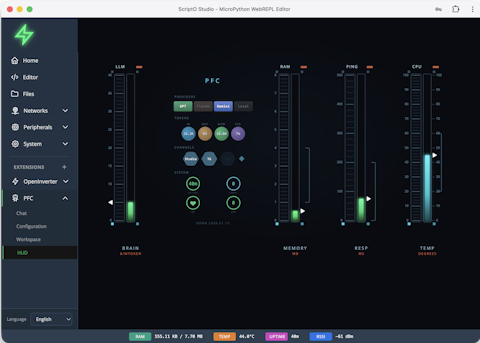
pycoClaw is a fully featured MicroPython implementation of OpenClaw - Adafruit Blog, Website and GitHub.
“The short version: it’s a full AI agent running on MicroPython on a $5 ESP32-S3. Not a “send a prompt and get a response” wrapper — a proper OpenClaw-compatible agent loop with recursive tool calling, context compaction, persistent memory (hybrid TF-IDF + vector search, SD card backed), multi-model routing, background tasks, the works.”
Microsoft (Looks to) Unify Python Environments: a Review

If you are prepared to use VS Code, which isn’t a bad Python IDE, the new Microsoft Python Environments extension attempts to tame the mess that is illustrated in the xkcd cartoon - i-programmer and Microsoft Blog.
“Is this the end of the Python package mess? Clearly the answer has to be ‘no’ a because the mess still exists - it’s just hidden beneath a layer of code. It is still the part of Python I dislike the most, but at least I might be able to forget about it for a while longer.”
How to Build Your Own MCP Server with Python
A free guide on how to build an LLM MCP Server with Python - Free Code Camp.
“Building an MCP server gives you control and flexibility. You can connect AI models directly to your databases or internal systems, automate repetitive actions, and decide exactly what data an AI model can access. It also allows you to experiment quickly. You can start small with a few simple tools and expand later into complex workflows. By creating your own MCP server, you’re not just writing code – you’re defining how intelligent systems interact with the real world through your logic and data.”
Fault Injection Attacks Bypassing Secure Boot on the Raspberry Pi RP2350

0xor0ne on X posts about accomplishing fault injection attacks bypassing secure boot on the Raspberry Pi RP2350 in a paper - X and Paper (PDF).
This Week’s Python Streams

Python on Hardware is all about building a cooperative ecosphere which allows contributions to be valued and to grow knowledge. Below are the streams within the last week focusing on the community.
CircuitPython Deep Dive Stream

Last Friday, Tim stepped in for Scott to talk light sensor drivers and guides.
You can see the latest video and past videos on the Adafruit YouTube channel under the Deep Dive playlist - YouTube.
CircuitPython Parsec

John Park’s CircuitPython Parsec this week is on hiatus as he rebuilds his streaming set-up after a crash.
Catch all the episodes in the YouTube playlist.

Paul welcomes Michelle Hui and Reitweic Shandilya to the show, both of whom are master’s students at Cornell Tech. Michelle and Reitweic share the Open Pressure Sensor, an open source medical device that helps physicians assist mastectomy patients which uses CircuitPython as its firmware - The CircuitPython Show.

NEW: Last week, Tim streamed work on investigating the lvfontio core module & looked to use the Pi Debug Probe on hard crash.
You can see the latest video and past videos on the Adafruit YouTube channel under the Deep Dive playlist - YouTube.
CircuitPython Weekly Meeting
CircuitPython Weekly Meeting for March 2nd, 2026 (notes) on YouTube.
Project of the Week: PiComputer Flip DVI
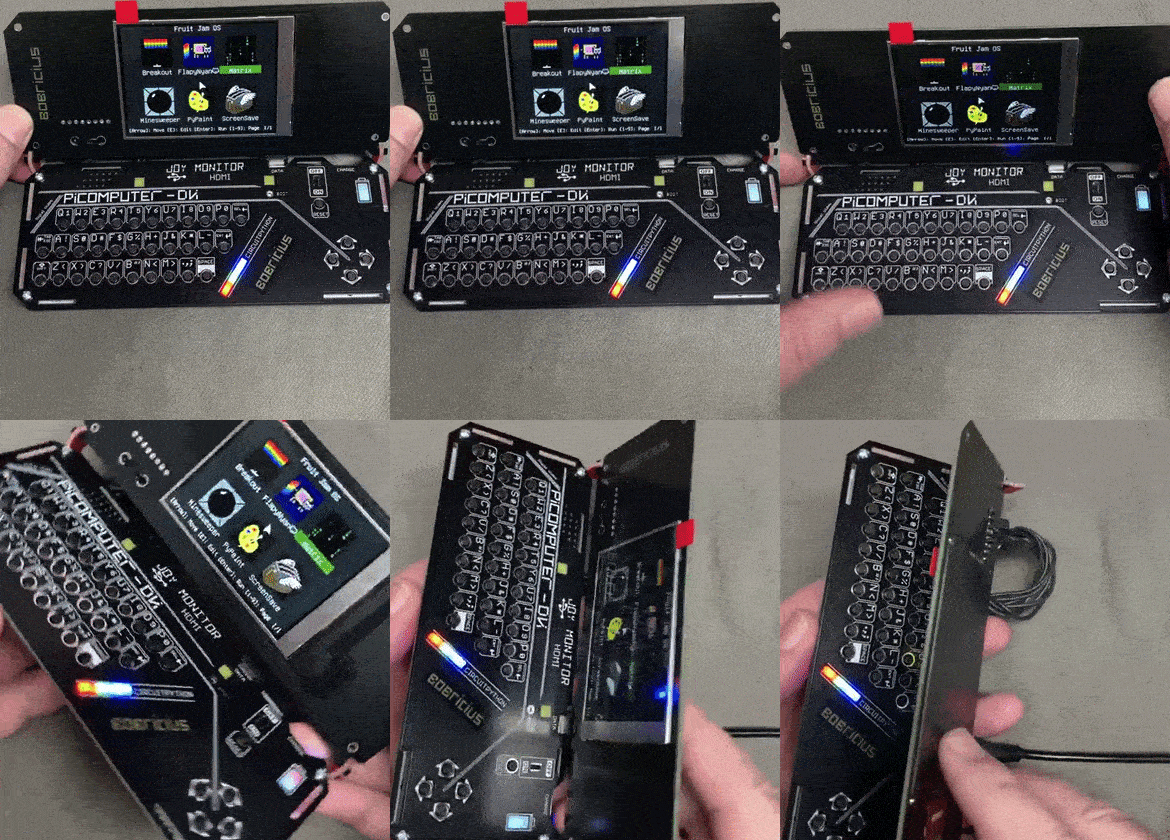
bobricius shows a fabulous WIP project, the PiComputer Flip DVI runs CircuitPython and Fruit Jam OS and has HDMI, Raspberry Pi Pico 2(W), a 2.8” IPS LCD, SD card, speaker, 3.5 audio with speaker switch, a Hall Effect sensor to turn off the display, perhaps retro emulation, and USB Host - X.
Popular Last Week: Free eBook - The Big Book of Small Python Projects

What was the most popular, most clicked link, in last week’s newsletter? The Big Book of Small Python Projects.
Did you know you can read past issues of this newsletter in the Adafruit Daily Archive? Check it out.
New Notes from Adafruit Playground
Adafruit Playground is a new place for the community to post their projects and other making tips/tricks/techniques. Ad-free, it’s an easy way to publish your work in a safe space for free.

Project StarTraffic - Adafruit Playground.
News From Around the Web
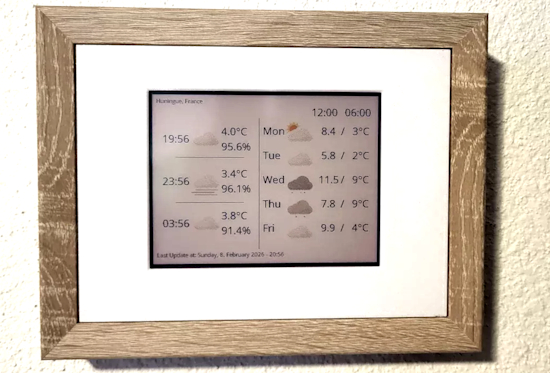
A wall-mounted weather forecast that blends in with your interior, created with e-paper, MicroPython and Raspberry Pi Pico 2W - FabScene and GitHub. Via X.

CircuitPython_Nitroclass is a new CircuitPython library to supercharge CircuitPython classes, similar to CPython dataclasses - GitHub. Via Mastodon.

Last week’s headline talked about Reticulum availability for MicroPython. YouTube user Rooster tech has created a Reticulum LXMF messenger on a LILYGO T-Deck with a basic GUI for secure communication - YouTube.

What I learned using Claude Sonnet to migrate Python to Rust - InfoWorld.

Build a Polyphonic DJ Board for Raspberry Pi Pico (CircuitPython School) - YouTube and GitHub.

Pico DJ Board! Use an Adalogger CowBell to Boost Storage w/a microSD card (CircuitPython School) - YouTube.

Your editor has been working on generating VGA analog video with the RP2350B microcontroller on the Adafruit Metro RP2350 board. Hardware is no issue but software, using CircuitPython and PIO, has its limitations. I think CircuitPython would allow others to change things easier. But there are small PIO differences in CircuitPython and memory limitations for framebuffers. The results will be published as work progresses - X.
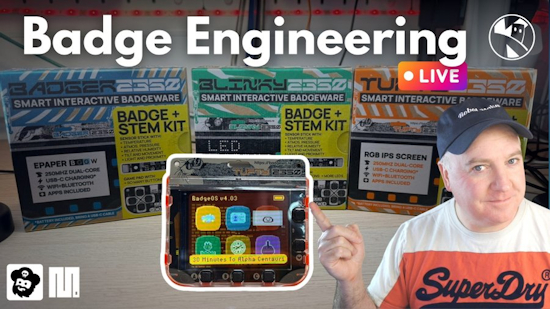
These 3 Pimoroni badges are INCREDIBLE! Using the Blinky 2350, Tufty 2350 and the classic Badger 2350 with MicroPython - YouTube.

“Howdy Folks, I’m Michael Pyrcz, a professor at The University of Texas at Austin, and I record all of my lectures and put them on YouTube so anyone can follow along! …and I kept doing that, and writing a Python package, along with 2 free, online e-books, 100s of Python demonstration workflows, dozens of synthetic datasets, etc. etc.” - YouTube. Via X.

Making an input board for Minecraft with a Raspberry Pi Pico and CircuitPython - X (Japanese).

Air Quality sensor version 3 is now tested and working. It has a 3D printed case. The device sends data to the database using IoT/MQTT and shows on a display. Coded in MicroPython on an ESP32 - Mastodon and Codeberg (Finnish).
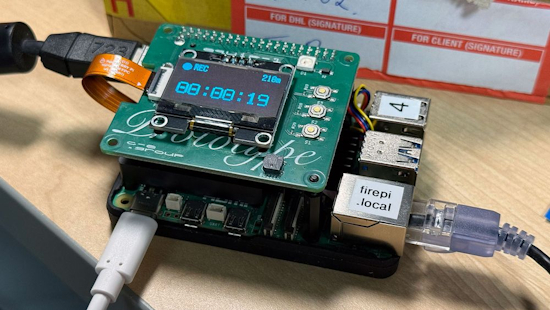
Sneak peek of recording DV over FireWire on a Raspberry Pi 5, via the prototype Firehat - BlueSky.

What is the Raspberry Pi CM0? And.. why? - bret.dk.

Raspberry Pi Pico projects - Raspberry Pi News.

Vasco Guita provides Raspberry Pi homelabbers a gift: scratch Raspberry Pi OS Docker images. Built from Raspberry Pi’s official operating system images, these 32-bit and 64-bit images get your Docker containers up and running fast - hackster.io.
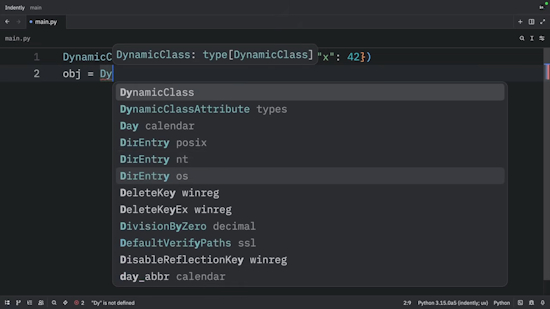
Metaclasses in Python are awesome - YouTube.
New

LILYGO has released the T-Halow P4, a compact development board built around Espressif’s ESP32-P4 RISC-V SoC with integrated Wi-Fi HaLow support. The T-Halow P4 is built around the ESP32-P4, which features a dual-core 32-bit RISC-V processor running at up to 360 MHz alongside a 40 MHz low-power RISC-V coprocessor. The board includes 16MB of external NOR flash and 8MB of PSRAM - LinuxGizmos.
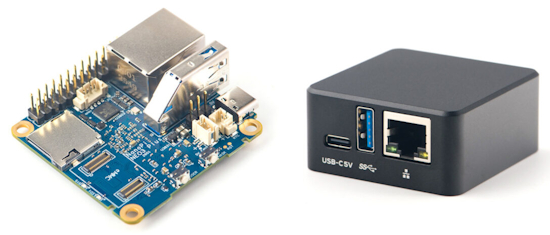
FriendlyELEC NanoPi NEO3 Plus is an ultra-compact headless SBC powered by a Rockchip RK3528A SoC paired with 1GB RAM, whose main interfaces are a Gigabit Ethernet jack, a USB 3.2 port, and a 26-pin GPIO header. Optional eMMC flash instead of SD, metal case - CNX.
New Boards Supported by CircuitPython
The number of supported microcontrollers and Single Board Computers (SBC) grows every week. This section outlines which boards have been included in CircuitPython or added to CircuitPython.org.
This week there were no new boards added.
Note: For non-Adafruit boards, please use the support forums of the board manufacturer for assistance, as Adafruit does not have the hardware to assist in troubleshooting.
Looking to add a new board to CircuitPython? It’s highly encouraged! Adafruit has four guides to help you do so:
New Adafruit Learning System Guides
The Adafruit Learning System has over 3,200 free guides for learning skills and building projects including using Python.

MIDI Breath Controller from Liz Clark
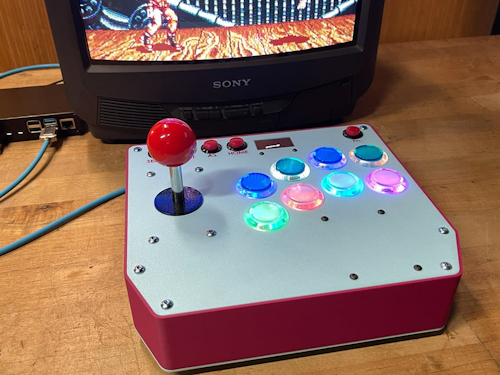
Arcade Fightstick from John Park

Melting Picture Frame for PyPortal IoT images from Ruiz Brothers
CircuitPython Libraries

The CircuitPython library numbers are continually increasing, while existing ones continue to be updated. Here we provide library numbers and updates!
To get the latest Adafruit libraries, download the Adafruit CircuitPython Library Bundle. To get the latest community contributed libraries, download the CircuitPython Community Bundle.
If you’d like to contribute to the CircuitPython project on the Python side of things, the libraries are a great place to start. Check out the CircuitPython.org Contributing page. If you’re interested in reviewing, check out Open Pull Requests. If you’d like to contribute code or documentation, check out Open Issues. We have a guide on contributing to CircuitPython with Git and GitHub, and you can find us in the #help-with-circuitpython and #circuitpython-dev channels on the Adafruit Discord.
You can check out this list of all the Adafruit CircuitPython libraries and drivers available.
The current number of CircuitPython libraries is 557!
New Libraries
Here are this week’s new CircuitPython libraries:
Updated Libraries
Here are this week’s updated CircuitPython libraries:
What’s the CircuitPython team up to this week?
What is the team up to this week? Let’s check in:
Dan
This week I’ve continued to work on SD card problems. I am also fixing an issue with managing the SPI object used for a user-created display.
Tim
This week I’ve been digging further into a few things in lvfontio core module. I found that using certain fonts as the terminal font causes a hard crash and I’ve been learning how to use GDB and the Pico debug probe to get core stack traces and investigate variable values at the time of the crash. A different issue is causing only the half of full-width glyphs to show in the CircuitPython terminal and I’ve figured out the root cause of that and submitted a fix. I started a new weekly stream on the Adafruit channels at 11am Eastern on Tuesdays, this week was the first episode. During the stream I discovered the full-width glyph issue.
Scott
This week I’m continuing to push the Zephyr port forward on a number of fronts. First, I updated the Zephyr version we’re based on to something more current. I’ve made progress on display support. Testing now covers different color modes of the display and passes locally. On GitHub Actions it is having trouble with SDL installation. BLE connection support is close to ready for merging. I’ve also just made a PR for adding memory usage to the native_sim’s perfetto trace for tracking how much memory is used by CircuitPython. I’ve got lots of balls in the air and am doing my best to get them each across the finish line.
Liz
This week I’ve been working on adding Arduino and CircuitPython support for the Xteink X4 eReader. This eReader uses an 800x480 display and uses an ESP32-C3. The USB port allows for JTAG over USB access which makes it easy for access. Arduino support is complete with a driver for the display added to the Adafruit_EPD library and I have the built-in display working in CircuitPython with the init added to the board.c file. For this project I finally got CircuitPython building locally with a Docker container. I run Windows and was never able to get CircuitPython building locally before.
Upcoming Events

PyCascades 2026 will be 20 March 2026 – 21 March 2026 in Vancouver, British Columbia, Canada - PyCascades 2026.

The next MicroPython Meetup in Melbourne will be on March 25th – Luma. You can see recordings of previous meetings on YouTube.
Other Events This Year
- PyCon DE & PyData 2026 will be 13 April 2026 – 17 April 2026 in Darmstadt, Germany
- PyCon US 2026 is May 13 - May 19, 2026 in Long Beach, California
- The Open Source Hardware Association Open Hardware Summit is coming to Berlin, Germany on May 23rd and 24th, 2026.
- EuroPython 2026 is coming to Kraków, Poland 13-19 July, 2026.
- PyOhio 2026 is from 25 July through 26 July, 2026 this year in Cleveland, USA.
- PyCon AU 2026 will be 26 Aug. 2026 – 30 Aug. 2026 in Brisbane, Australia
If you know of virtual events or upcoming events, please let us know via email to cpnews(at)adafruit(dot)com.
Latest Releases
CircuitPython’s stable release is 10.1.3 and its unstable release is 10.1.0-beta.1. New to CircuitPython? Start with our Welcome to CircuitPython Guide.
20260305 is the latest Adafruit CircuitPython library bundle.
20260228 is the latest CircuitPython Community library bundle.
v1.27.0 is the latest MicroPython release. Documentation for it is here.
3.14.3 is the latest Python release. The latest pre-release version is 3.15.0a6.
4,477 Stars Like CircuitPython? Star it on GitHub!
Call for Help – Translating CircuitPython is now easier than ever
One important feature of CircuitPython is translated control and error messages. With the help of fellow open source project Weblate, we’re making it even easier to add or improve translations.
Sign in with an existing account such as GitHub, Google or Facebook and start contributing through a simple web interface. No forks or pull requests needed! As always, if you run into trouble join us on Discord, we’re here to help.
39,098 Thanks


The Adafruit Discord community, where we do all our CircuitPython development in the open, reached over 39,098 humans - thank you! Adafruit believes Discord offers a unique way for Python on hardware folks to connect. Join today at https://adafru.it/discord.
ICYMI - In case you missed it

Python on hardware is the Adafruit Python video-newsletter-podcast! The news comes from the Python community, Discord, Adafruit communities and more and is broadcast on ASK an ENGINEER Wednesdays. The complete Python on Hardware weekly videocast playlist is here. The video podcast is on iTunes, YouTube, Instagram), and XML.
The weekly community chat on Adafruit Discord server CircuitPython channel - Audio / Podcast edition - Audio from the Discord chat space for CircuitPython, meetings are usually Mondays at 2pm ET, this is the audio version on iTunes, Pocket Casts, Spotify, and XML feed.
Contribute
The CircuitPython Weekly Newsletter is a CircuitPython community-run newsletter emailed every Monday. To contribute your content, please email your news to cpnews (at) adafruit (dot) com with information and link(s) to your content.
Join the Adafruit Discord or post to the forum if you have questions.